
Auto OAuth Chrome 插件, crx 扩展下载
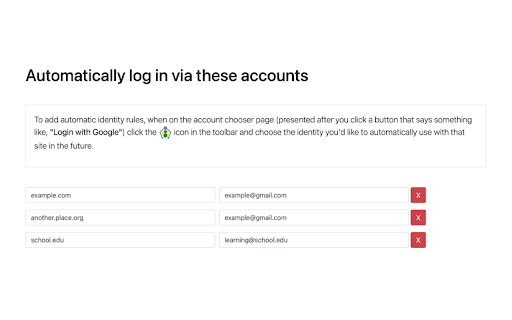
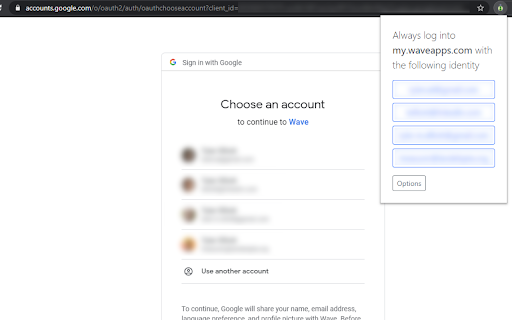
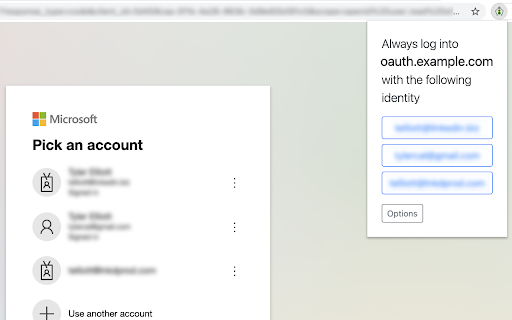
Automatically log into sites with OAuth without having to always choose the account.
When you have multiple Google or Microsoft accounts (for work, home, etc) every time you try to log into a website via OAuth, like with the "Login with Google" button, you have to choose the account you want to use.
This extension allows you to choose a selected account per site that you'll always want to use in the future - one fewer click!
Release Notes:
1.1.1 - Fix a bug that did not handle encoded redirect URLs
1.1.0 - Handle Auth in popup windows via a new context menu option
1.0.7 - Add detection for SAML based logins
1.0.6 - Help account choosing in Microsoft OAuth by pre-filling domains when available
1.0.5 - Handle new Google OAuth choice format
1.0.4 - Handle additional Google OAuth URL suffixes
1.0.3 - Import/Export settings
1.0.2 - Fix a bug preventing Google URLs from being parsed correctly
1.0.1 - Add support for Microsoft OAuth
1.0.0 - Initial release
| 分类 | 📝工作流程与规划 |
| 插件标识 | glhekmchljganpiecbdefijjkppbeinj |
| 平台 | Chrome |
| 评分 |
☆☆☆☆☆
|
| 评分人数 | |
| 插件主页 | https://chromewebstore.google.com/detail/auto-oauth/glhekmchljganpiecbdefijjkppbeinj |
| 版本号 | 25.2.3.0 |
| 大小 | 113KiB |
| 官网下载次数 | 98 |
| 下载地址 | |
| 更新时间 | 2023-08-12 00:00:00 |
CRX扩展文件安装方法
第1步: 打开Chrome浏览器的扩展程序
第2步:
在地址栏输入: chrome://extensions/
第3步: 开启右上角的【开发者模式】
第4步: 重启Chrome浏览器 (重要操作)
第5步: 重新打开扩展程序管理界面
第6步: 将下载的crx文件直接拖入页面完成安装
注意:请确保使用最新版本的Chrome浏览器