
Analytic Highlighter Chrome 插件, crx 扩展下载
NLP Powered Keyword Extractor
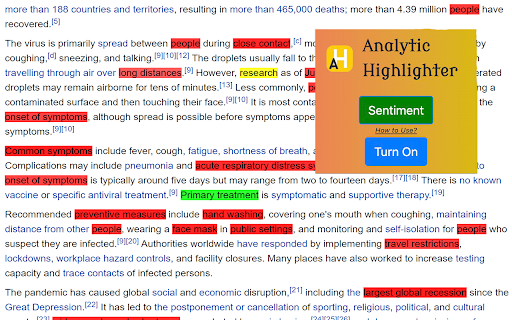
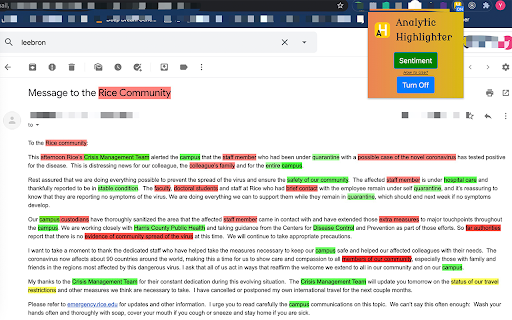
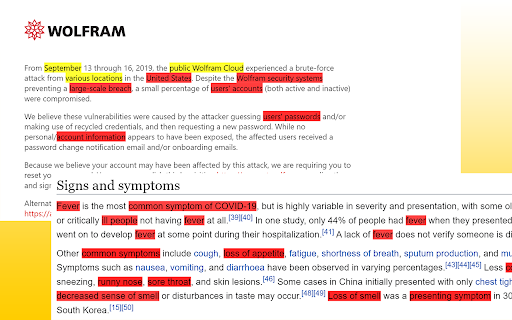
Have you ever run into a long document and had no idea where to start reading? Have you had a hard time extracting key information from a research paper? Have you ever had trouble looking for answers to your questions on a web page? Maybe you want a magical tool that can extract key information for you? Let this chrome extension do for you!
When you turn on the Analytic Highlighter, it will select the whole content in the webpage as default. It then utilizes AI to extract and highlight key phrases in the content.
Users can also select a specific paragraph and press "shift" key to highlight the key phrases appeared in that paragraph throughout the whole webpage.
| 分类 | 📝工作流程与规划 |
| 插件标识 | gngfhmbddijbejbddcojohokhnblfina |
| 平台 | Chrome |
| 评分 |
☆☆☆☆☆
|
| 评分人数 | |
| 插件主页 | https://chromewebstore.google.com/detail/analytic-highlighter/gngfhmbddijbejbddcojohokhnblfina |
| 版本号 | 25.2.3.0 |
| 大小 | 23.52KiB |
| 官网下载次数 | 18 |
| 下载地址 | |
| 更新时间 | 2020-06-27 00:00:00 |
CRX扩展文件安装方法
第1步: 打开Chrome浏览器的扩展程序
第2步:
在地址栏输入: chrome://extensions/
第3步: 开启右上角的【开发者模式】
第4步: 重启Chrome浏览器 (重要操作)
第5步: 重新打开扩展程序管理界面
第6步: 将下载的crx文件直接拖入页面完成安装
注意:请确保使用最新版本的Chrome浏览器