
Duplicate Tabs Closer Chrome 插件, crx 扩展下载


Duplicate Tabs Closer
Duplicate Tabs Closer detects and closes duplicate tabs.
Version 3.1.6 changelog:
* Fix: Options were not saved in some situations
* Fix: Filter "ignore hash part" didn't work with "ignore search part" enabled
* Fix: The new tab and the existing tab were both closed in some situations
* New: Add an option to change the badge background color
* Some code optimizations
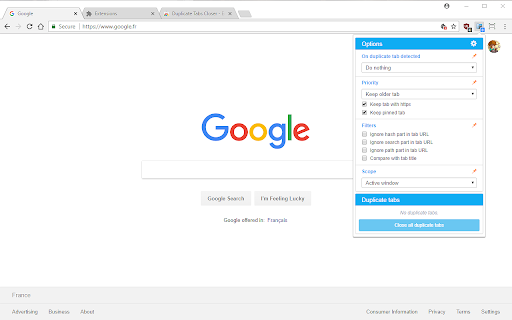
★ "On duplicate tab detected" options:
- Close tab automatically: automatically closes the detected duplicate tab.
- Do nothing: monitor tabs and update the badge icon to indicate the number of duplicate tabs detected.
★ On remaining tab options (used with "Close tab automatically):
- Do nothing (default): nothing is done after the duplicate tab is closed.
- Activate: once the duplicate tab is closed, the remaining tab is activated.
- Apply opening tab behavior: once the duplicate tab is closed, depending on the default tab behavior, the remaining tab will be moved to the position of the closed tab and activated if needed.
★ "Priority" options (used with "Close tab automatically" mode and "Close all duplicate tabs" button):
- Keep older tab (default): Keep the already existing tab.
- Keep newer tab: Keep the newer tab.
- Keep tab with https (default on): Ignore the scheme part during comparison and keep the tab with the https scheme.
- Keep pinned tab (default on): Keep the pinned tab.
★ Filters options:
- Ignore hash part in URL (default off): for instance https://addons.mozilla.org/en-US/firefox/addon/duplicate-tabs-closer/#detail-relnotes and https://addons.mozilla.org/en-US/firefox/addon/duplicate-tabs-closer will be considered as the same URL.
- Ignore search part in URL (default off): for instance https://addons.mozilla.org/en-US/firefox/addon/duplicate-tabs-closer/?src=ss and https://addons.mozilla.org/en-US/firefox/addon/duplicate-tabs-closer will be considered as the same URL.
- Ignore path part in URL (default off): for instance https://addons.mozilla.org/en-US/developers and https://addons.mozilla.org/en-US/firefox/addon/duplicate-tabs-closer will be considered as the same URL.
- Compare with tab title (default off): If the URL doesn't match then compare using the tab title.
★ Scope options:
- Active window (default): only closes/displays duplicate tabs that belong to a same window.
- All window: closes/displays duplicate tabs for all windows.
★ Hotkey:
- Alt+Shift+W to close all duplicate tabs (this could be configured in the options in future version)
For bug reports and feature requests:
http://forums.mozillazine.org/viewtopic.php?f=48&t=2665523
| 分类 | 📝工作流程与规划 |
| 插件标识 | gnmdbogfankgjepgglmmfmbnimcmcjle |
| 平台 | Chrome |
| 评分 |
☆☆☆☆☆
|
| 评分人数 | |
| 插件主页 | https://chromewebstore.google.com/detail/duplicate-tabs-closer/gnmdbogfankgjepgglmmfmbnimcmcjle |
| 版本号 | 2.0.0 |
| 大小 | 1.03MiB |
| 官网下载次数 | 20000 |
| 下载地址 | |
| 更新时间 | 2020-06-14 00:00:00 |
CRX扩展文件安装方法
第1步: 打开Chrome浏览器的扩展程序
第2步:
在地址栏输入: chrome://extensions/
第3步: 开启右上角的【开发者模式】
第4步: 重启Chrome浏览器 (重要操作)
第5步: 重新打开扩展程序管理界面
第6步: 将下载的crx文件直接拖入页面完成安装
注意:请确保使用最新版本的Chrome浏览器