
Quick moodboards Chrome 插件, crx 扩展下载

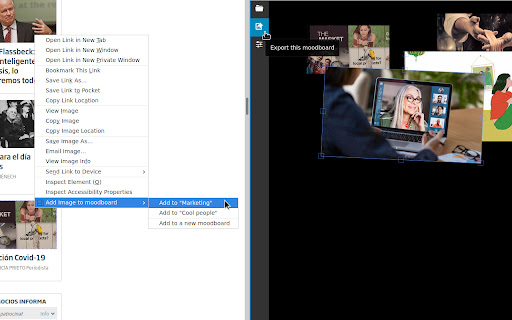
Make moodboards quickly by collecting images through the browser contextual menu
"A mood board is a type of visual presentation or a collage consisting of images, text, and samples of objects in a composition. It can be based upon a set topic or can be any material chosen at random. A mood board can be used to convey a general idea or feeling about a particular topic. They may be physical or digital, and can be effective presentation tools." [1]
The extension adds a new option in the browser contextual menu to "Add an image to a moodboard". That option appears when you right click anywhere on a website. The first time you must "Add it to a new moodboard" and introduce a name for it. Latter on you may add the image to an existing moodboard or create a new one. If no image was found in the exact position where you right clicked, nothing will happen.
The "Quick moodboards" button on the main browser toolbar will open the moodboards. That view is still quite limited. Use the first icon (top left) to select the visible moodboard. You can move images around freely. Click an image to bring it to the front and press `delete` key while it is selected to remove it. Moodboards are saved automatically. Notice there is no do/undo functionality.
[1] https://en.wikipedia.org/wiki/Mood_board
| 分类 | 🎨艺术与设计 |
| 插件标识 | gpenmhgbjlncefmpebmegignbjpjknek |
| 平台 | Chrome |
| 评分 |
☆☆☆☆☆
|
| 评分人数 | |
| 插件主页 | https://chromewebstore.google.com/detail/quick-moodboards/gpenmhgbjlncefmpebmegignbjpjknek |
| 版本号 | 2.3.0 |
| 大小 | 273KiB |
| 官网下载次数 | 448 |
| 下载地址 | |
| 更新时间 | 2020-04-02 00:00:00 |
CRX扩展文件安装方法
第1步: 打开Chrome浏览器的扩展程序
第2步:
在地址栏输入: chrome://extensions/
第3步: 开启右上角的【开发者模式】
第4步: 重启Chrome浏览器 (重要操作)
第5步: 重新打开扩展程序管理界面
第6步: 将下载的crx文件直接拖入页面完成安装
注意:请确保使用最新版本的Chrome浏览器