
Universal Price Checker - Tracker Chrome 插件, crx 扩展下载
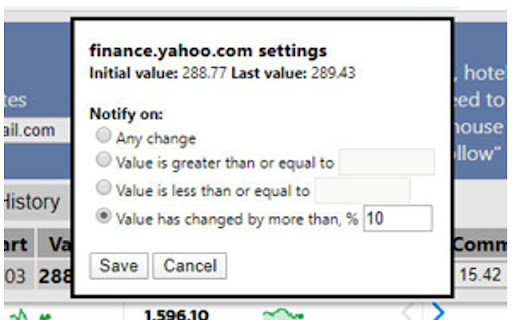
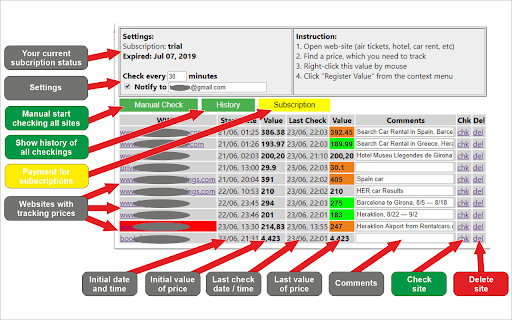
Track and check any value or price on any website you need. Get notification by Email and Telegram on values changes.
Our service will tirelessly (once an hour by default) check ANY PRICES on ANY WEBSITE you need ! Regularly checks changing prices, allowing you to save hundreds on goods, hotel, car, airline ticket bookings, and more. (frequency of checks is adjustable).The service works locally on your computer in the environment of your Google Chrome - complete privacy of information. When prices changes on sites that have been configured in the service, you will receive a notification on the screen and a message to your email and your Telegram (customizable). Keep in mind - Our service works only while your computer is turned on and Google Chrome is running on it (enough in a minimized window).
4.500
New smart algorithm for multi-prices sites
Progress Bar on icon
Few bugs fixed
4.007
New feature - SEARCH
For Search start input on keyboard..
4.006
- minor bugs fixed
4.005
- minor bugs fixed
- 2nd version of similar trackings algorithm
4.002
- minor bugs fixed
- Group tasks (check, delete, settings)
- New notification settings
- on increase
- on decrease
- New history mode
- Reset track function
- New events window with last events
-
version 3.20
Dismiss button in notifications
version 3.11
Some errors fix
version 3.10
Some errors fix
version 3.01
Multiple tracking - select "Follow all similar on the page" in context menu
version 2.66
- add default values to notification settings
version 2.65
- extended notification settings
- extended refresh settings (individual refresh setting for site)
- clickable Chrome popup notification
| 分类 | 🛍️购物 |
| 插件标识 | gpjkciopefegnhlfmkeeddglljgipiop |
| 平台 | Chrome |
| 评分 |
☆☆☆☆☆
|
| 评分人数 | |
| 插件主页 | https://chromewebstore.google.com/detail/universal-price-checker-t/gpjkciopefegnhlfmkeeddglljgipiop |
| 版本号 | 5.49 |
| 大小 | 267KiB |
| 官网下载次数 | 27 |
| 下载地址 | |
| 更新时间 | 2020-04-26 00:00:00 |
CRX扩展文件安装方法
第1步: 打开Chrome浏览器的扩展程序
第2步:
在地址栏输入: chrome://extensions/
第3步: 开启右上角的【开发者模式】
第4步: 重启Chrome浏览器 (重要操作)
第5步: 重新打开扩展程序管理界面
第6步: 将下载的crx文件直接拖入页面完成安装
注意:请确保使用最新版本的Chrome浏览器