
Amazonia Right Click Search - Amazon Co UK Chrome 插件, crx 扩展下载
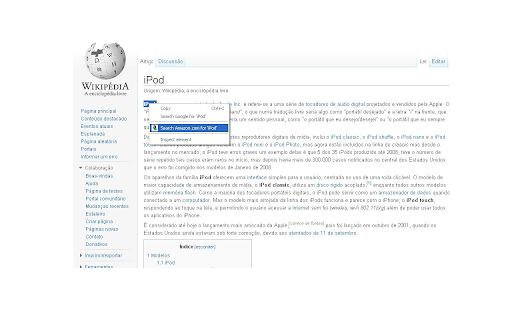
Search Amazon.co.uk products using the right click context menu.
Introducing Amazonia - just a right click away from the world’s largest online retailer.
Amazonia puts Amazon.co.uk just one click away with instant product search functionality for physical and virtual goods. This innovative Chrome extension allows you to stay productive and search Amazon within seconds - it has never been easier to get to products you want... through the content you love.
Simply, highlight a product name shown on any web page and right click on your mouse - from here you will be given the option to search search Amazon.co.uk for the product. Clicking this will lead you directly to a search result for it! It’s as simple as that!
| 分类 | 🛍️购物 |
| 插件标识 | gpmkacpkcakamljkjdjfgmncbpfjacjl |
| 平台 | Chrome |
| 评分 |
☆☆☆☆☆
|
| 评分人数 | |
| 插件主页 | https://chromewebstore.google.com/detail/amazonia-right-click-sear/gpmkacpkcakamljkjdjfgmncbpfjacjl |
| 版本号 | 3.4.7 |
| 大小 | 25.91KiB |
| 官网下载次数 | 7000 |
| 下载地址 | |
| 更新时间 | 2018-08-11 00:00:00 |
CRX扩展文件安装方法
第1步: 打开Chrome浏览器的扩展程序
第2步:
在地址栏输入: chrome://extensions/
第3步: 开启右上角的【开发者模式】
第4步: 重启Chrome浏览器 (重要操作)
第5步: 重新打开扩展程序管理界面
第6步: 将下载的crx文件直接拖入页面完成安装
注意:请确保使用最新版本的Chrome浏览器