
OmniDrive Chrome 插件, crx 扩展下载
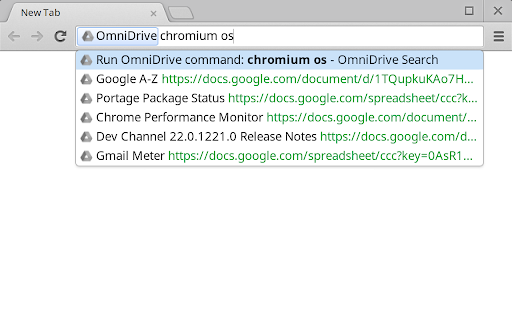
Add support to the omnibox to search in Google Drive.
Type "drive" in your omnibox, press <space> and look for something in your Google Drive.
Note: if you'd like this experience to be part of Google Chrome, go to http://crbug.com/143622 and star it.
------------------------------------------------
Changelog:
3.6:
- Adapt folder URL to link to personal Google Drive (thanks to MartinLichtblau)
3.5:
- Increased delay before actually asking Google Drive
3.4:
- Add delay before actually asking Google Drive
3.3:
- Suggested results for non-Google documents thanks to bkennelly
3.2:
- Added new keywords:
+ "new doc" opens https://docs.google.com/create
+ "new sheet" opens https://sheets.google.com/create
+ "new slide" opens https://slides.google.com/create
+ "new drawing" opens https://drawings.google.com/create
+ "new form" opens https://forms.google.com/create
3.1:
- Added Log in message when user is not logged in yet.
3: (chrome 29 required)
- Switched to chrome.identity to improve permission flow
- Removed permissions that were not needed anymore
2:
- Do not consume memory when it's doing nothing thanks to Event pages.
- Do not ask for Google authentication when it's not needed.
1.2.1:
- Cleaned up some code.
This extension is Open Source. For full details, go to https://code.google.com/p/omnidrive/source/list
| 分类 | 📝工作流程与规划 |
| 插件标识 | gpnikbcifngfgfcgcgfahidojdpklfia |
| 平台 | Chrome |
| 评分 |
☆☆☆☆☆
|
| 评分人数 | |
| 插件主页 | https://chromewebstore.google.com/detail/omnidrive/gpnikbcifngfgfcgcgfahidojdpklfia |
| 版本号 | 25.2.3.0 |
| 大小 | 12.45KiB |
| 官网下载次数 | 5000 |
| 下载地址 | |
| 更新时间 | 2016-04-18 00:00:00 |
CRX扩展文件安装方法
第1步: 打开Chrome浏览器的扩展程序
第2步:
在地址栏输入: chrome://extensions/
第3步: 开启右上角的【开发者模式】
第4步: 重启Chrome浏览器 (重要操作)
第5步: 重新打开扩展程序管理界面
第6步: 将下载的crx文件直接拖入页面完成安装
注意:请确保使用最新版本的Chrome浏览器