
Make Rikkeisoft News Great Again Chrome 插件, crx 扩展下载

Utilities for Rikkeisoft News.
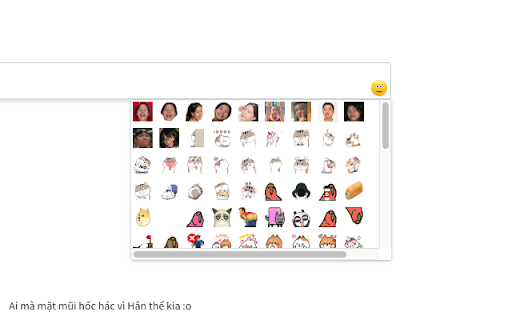
Use your favorite emoticons on Rikkeisoft News.
FEATURES:
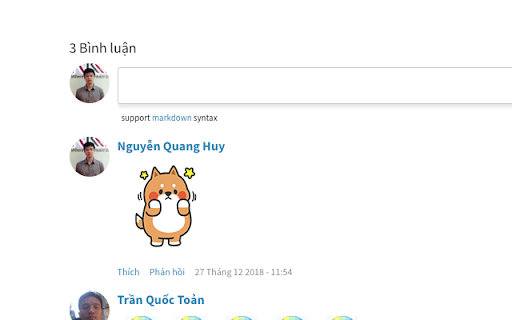
- Use funny stickers in Comment section.
- Hide useless *New* ribbon in homepage.
- Keep the header position fixed on PC screen (> 1200px).
- Display Markdown Cheatsheet under comment editor.
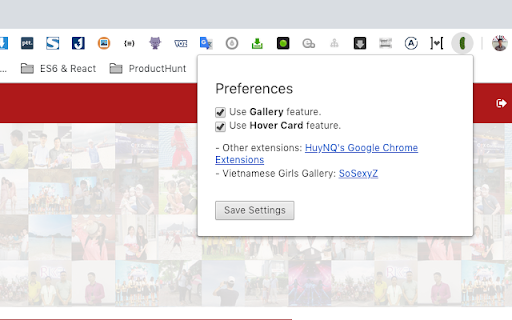
- Add Hover Card feature for displaying tagged user Information in Comment section.
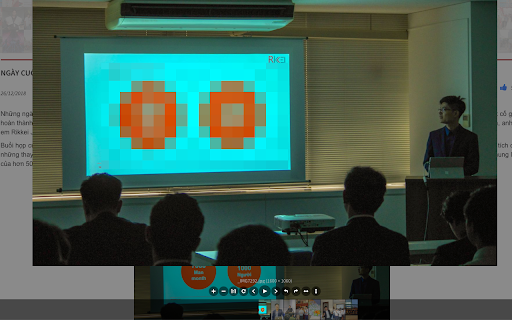
- View images in Post in Gallery Mode.
CHANGELOG:
- v0.9.3.8:
+ Enable sticker comment for CungKeLai.
- v0.9.3.7:
+ Fix emoji menu do not load.
- v0.9.3.6:
+ Display correct role on profile card.
+ Fix styling of avatar on profile card.
- v0.9.3:
+ Add option to disable autoplayed video on Multimedia widget.
+ Add Hover Card for Top Members.
- v0.9.0:
+ Hotfix for Youtube layout.
- v0.8.8:
+ Hotfix for new design.
+ Fix display profile picture on comment.
- v0.8.3:
+ Fix alignment in Profile card.
- v0.8.2:
+ Upgrade Viewer.JS to 1.5.0.
- v0.8.1:
+ Fix floating menu is displayed on other rikkei.vn pages.
- v0.8.0:
+ Add Sticker Preview popup. Now you can preview large stickers before using it.
+ Upgrade Gallery Viewer for better performance.
- v0.7.2:
+ Fix undefined when display profile popover.
- v0.7.1:
+ Change markdown help link.
- v0.7.0:
+ Change extension main icon.
- v0.6.9:
+ Change background color of profile popover.
- v0.6.6:
+ Re-enable hot update for stickers.
- v0.6.5:
+ Fix sticker picker closes after scrolling.
- v0.6.3:
+ Fix focused editor issue.
+ Fix caching for member profile.
+ Disable update check for better performance.
- v0.6.2:
+ Fix styling of Menu toggling button.
- v0.6.0:
+ Code refactoring.
- v0.5.7:
+ Block bad words.
- v0.5.5:
+ Add more funny cat stickers.
+ Change toggle sidebar icon.
- v0.5.2:
+ Add Mimi & Neko stickers.
+ Display Toggle Sidebar button in Category page.
- v0.5.0:
+ Add RongVang sticker pack.
+ Remove Piggy sticker pack.
+ Add Toggle Sidebar button to show the sidebar.
- v0.3.5:
+ Add Piggy Sticker pack for Tet Holiday.
- v0.3.3:
+ Add Kanahei Sticker pack.
+ Add Gallery feature for viewing images in a post without scrolling.
+ Add Options page.
- v0.2.9:
+ Add Hover Card feature for displaying User Information on Comment Section.
+ Fix sticker picker button is oversized.
- v0.2.2:
+ Make default emoticons smaller.
+ Remove `See more` button.
- v0.2.1
+ Add more stickers.
+ Inject CSS for better performance.
+ Fix append emoticon to incorrect comment editor.
- v0.1.7:
+ Fixed header location on PC screen.
- v0.1.6:
+ Fix displaying emoticon incorrectly.
+ Add Markdown Cheatsheet under comment section.
+ Support Markdown editor in Emoticon picker.
- v0.1.2:
+ Add more emoticons.
+ Hide *New* ribbon in homgepage.
+ Change smile emoticons to a funny emoticon.
- v0.0.9:
+ Fix JS error in homepage.
+ Display post list and post detail in full width.
- v0.0.8:
+ Add custom emoticons to emoticon picker.
Submit your ideas/funny stickers/emoticons to: [email protected]
This is an open source project. Hosted on GitHub: https://github.com/Code4Fap/make-rikkeisoft-news-great-again
Homepage: https://ext.huynq.net/
| 分类 | 🎉趣味休闲 |
| 插件标识 | hapbddhkinmicngpnkhmelghidjikcab |
| 平台 | Chrome |
| 评分 |
☆☆☆☆☆
|
| 评分人数 | |
| 插件主页 | https://chromewebstore.google.com/detail/make-rikkeisoft-news-grea/hapbddhkinmicngpnkhmelghidjikcab |
| 版本号 | 3.0.0.18 |
| 大小 | 35.33KiB |
| 官网下载次数 | 61 |
| 下载地址 | |
| 更新时间 | 2021-11-05 00:00:00 |
CRX扩展文件安装方法
第1步: 打开Chrome浏览器的扩展程序
第2步:
在地址栏输入: chrome://extensions/
第3步: 开启右上角的【开发者模式】
第4步: 重启Chrome浏览器 (重要操作)
第5步: 重新打开扩展程序管理界面
第6步: 将下载的crx文件直接拖入页面完成安装
注意:请确保使用最新版本的Chrome浏览器