
JavaScript Libraries On the fly! Chrome 插件, crx 扩展下载

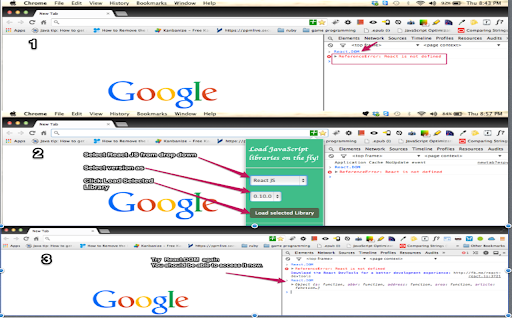
Load JavaScript libraries to current page on the fly for testing or trying something!
This extension is useful for developers who love to do experiments with JavaScript libraries. Using this extension you can load popular JavaScript libraries in current tab context. I implemented this for my daily use. When I read some blog or some tutorial about popular libraries like Backbone, Angular JS. I really like to use that library in chrome developer tool and try few things. Instead of going to editor and create some html file and doing couple of steps to try some thing in my favorite library.
See video at
https://www.youtube.com/watch?v=DbZYhArBzqM&feature=youtube_gdata_player
| 分类 | 💻开发者工具 |
| 插件标识 | hbamkklhfcfijoadciojpjbgpinfbofi |
| 平台 | Chrome |
| 评分 |
☆☆☆☆☆
|
| 评分人数 | |
| 插件主页 | https://chromewebstore.google.com/detail/javascript-libraries-on-t/hbamkklhfcfijoadciojpjbgpinfbofi |
| 版本号 | 8.3 |
| 大小 | 50.86KiB |
| 官网下载次数 | 147 |
| 下载地址 | |
| 更新时间 | 2014-03-28 00:00:00 |
CRX扩展文件安装方法
第1步: 打开Chrome浏览器的扩展程序
第2步:
在地址栏输入: chrome://extensions/
第3步: 开启右上角的【开发者模式】
第4步: 重启Chrome浏览器 (重要操作)
第5步: 重新打开扩展程序管理界面
第6步: 将下载的crx文件直接拖入页面完成安装
注意:请确保使用最新版本的Chrome浏览器