
Sniperrr Chrome 插件, crx 扩展下载
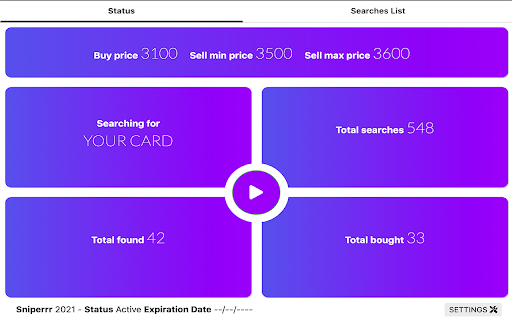
Automate your sniping!
This is the ultimate SNIPING tool for FUT.
Why it's the best?
- You Don't need to set up anything!
- You Don't need to do anything for the Snipe process!
- You can even close the FUT webapp page (But keep an instance of chrome active)
- We will do all the stuffs for you
The only thing you need to do is to search for a player with a buy price max, open the Sniperrr popup and click play!
We will search that player for you and buy it.
USAGE:
FIND ALL THE USAGE INSIDE THE APP!
ANTI BAN SYSTEM:
Depending on the frequency of the searches carried out, and the duration of the various breaks between them, the fut servers may become suspicious and request a captcha. Our anti-ban system understands when a captcha is requested and automatically stops the search. Then you just need to update the webapp page and resolve the captcha.
SETTINGS PAGE:
In the setting page you can set how often to perform a search, how many searches to make a pause, and the duration of the pause itself. In any case, we have prepared recommended settings for you.
DISCLAIMER:
Sniperrr and its developers do not assume responsibility for any type of illegal use given by the use of this tool.
CONTACTS:
For any type of problem, support, requests for improvement, do not hesitate to contact us at our email: [email protected]
The Sniperrr TEAM
| 分类 | 📝工作流程与规划 |
| 插件标识 | hbfhjphklnjcpfindkfbbajlaajkhbnh |
| 平台 | Chrome |
| 评分 |
☆☆☆☆☆
|
| 评分人数 | |
| 插件主页 | https://chromewebstore.google.com/detail/sniperrr/hbfhjphklnjcpfindkfbbajlaajkhbnh |
| 版本号 | 25.2.3.0 |
| 大小 | 616KiB |
| 官网下载次数 | 672 |
| 下载地址 | |
| 更新时间 | 2020-12-04 00:00:00 |
CRX扩展文件安装方法
第1步: 打开Chrome浏览器的扩展程序
第2步:
在地址栏输入: chrome://extensions/
第3步: 开启右上角的【开发者模式】
第4步: 重启Chrome浏览器 (重要操作)
第5步: 重新打开扩展程序管理界面
第6步: 将下载的crx文件直接拖入页面完成安装
注意:请确保使用最新版本的Chrome浏览器