
Quick Wikipedia Search Chrome 插件, crx 扩展下载
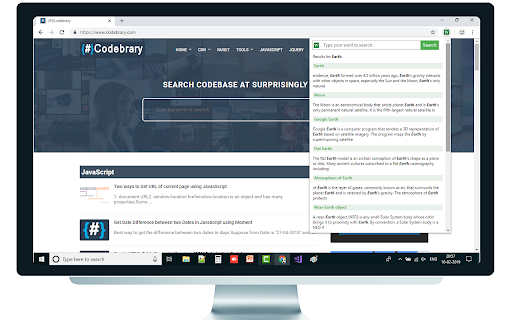
Quick Wikipedia Search something on wikipedia website right from web browser
Quick Wikipedia Search is google chrome extension that makes your task easier to quick search something on wikipedia website right from web browser without navigating to wikipedia website.
For your reference find the screenshot.
Wikipedia is a free encyclopedia, written collaboratively by the people who use it. It is a special type of website designed to make collaboration easy, called a wiki. Many people are constantly improving Wikipedia, making thousands of changes per hour.
I hope you like the Quick Wikipedia Search
Support:
If this extension has been valuable to you, please help us to keep the extension development in next level with adding great features in upcoming versions.
Any amount helps and is greatly appreciated!
https://www.payumoney.com/paybypayumoney/#/0F779D51191CA3AA46A04910276D858D
In case of any query/feedback feel free to reach out to us.
Thank You.
| 分类 | 🛠️工具 |
| 插件标识 | heimniiengmenilpfmpmmhadnlahblkn |
| 平台 | Chrome |
| 评分 |
☆☆☆☆☆
|
| 评分人数 | |
| 插件主页 | https://chromewebstore.google.com/detail/quick-wikipedia-search/heimniiengmenilpfmpmmhadnlahblkn |
| 版本号 | 1.8 |
| 大小 | 42.47KiB |
| 官网下载次数 | 38 |
| 下载地址 | |
| 更新时间 | 2019-02-14 00:00:00 |
CRX扩展文件安装方法
第1步: 打开Chrome浏览器的扩展程序
第2步:
在地址栏输入: chrome://extensions/
第3步: 开启右上角的【开发者模式】
第4步: 重启Chrome浏览器 (重要操作)
第5步: 重新打开扩展程序管理界面
第6步: 将下载的crx文件直接拖入页面完成安装
注意:请确保使用最新版本的Chrome浏览器