
VoiceMpower 'Click to Call' Extension Chrome 插件, crx 扩展下载
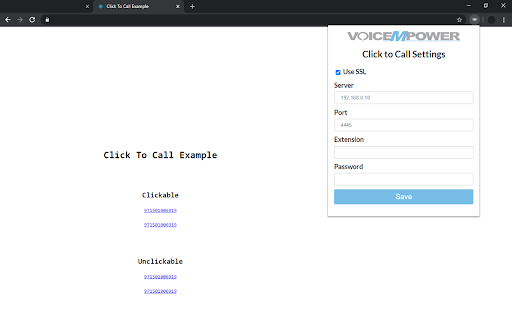
Converts phone numbers in any web page into 'click to call' links, using your Asterisk's PBX extension.
The 'VoiceMpower 'Click to Call' extension adds 'click to call' capabilities to any web page.
It converts phone numbers in any web page into 'click to call' links.
Clicking on the phone links starts a new call, using 'Asterisk PBX' extension.
This extension requires FOP2 ( Flash Operator Panel 2, available at http://www.fop2.com ).
What's new in 1.0.16: Fixed popup window position for new Chrome version.
What's new in 1.0.15: Added LogOut button.
What's new in 1.0.14: WebSocket reloaded when settings changed. The settings saved after Chrome restart.
What's new in 1.0.13: Reload settings during extension startup.
What's new in 1.0.12: Websocket moved to background. Added colored icons which indicates about connection status.
What's new in 1.0.11: Websocket ping is on.
What's new in 1.0.10: Ping is off to minimize the server load. The notification fixes.
What's new in 1.0.9: Fix for the case when the FOP2 url is equal to the CDR-Reports URL.
What's new in 1.0.8: Added 'Dial' context menu for selected phone numbers.
What's new in 1.0.7: Removing fix for 'chrome.runtime' error.
What's new in 1.0.6: Fix 'chrome.runtime' error.
What's new in 1.0.5: Fix for notifications. Hide old notifications when call is answered or hanged.
What's new in 1.0.4: Added notifications for incoming calls.
What's new in 1.0.3: Updated 'click to call' function. Now the FOP2 dial without additional confirmation.
What's new in 1.0.2: Updated icons.
What's new in 1.0.1: Support for pages with postponed content loading.
| 分类 | 👥社交 |
| 插件标识 | hfdogdaeajhbahclajmbfbldffdefcgn |
| 平台 | Chrome |
| 评分 |
☆☆☆☆☆
|
| 评分人数 | |
| 插件主页 | https://chromewebstore.google.com/detail/voicempower-click-to-call/hfdogdaeajhbahclajmbfbldffdefcgn |
| 版本号 | 3.128.4 |
| 大小 | 57.3KiB |
| 官网下载次数 | 54 |
| 下载地址 | |
| 更新时间 | 2021-06-10 00:00:00 |
CRX扩展文件安装方法
第1步: 打开Chrome浏览器的扩展程序
第2步:
在地址栏输入: chrome://extensions/
第3步: 开启右上角的【开发者模式】
第4步: 重启Chrome浏览器 (重要操作)
第5步: 重新打开扩展程序管理界面
第6步: 将下载的crx文件直接拖入页面完成安装
注意:请确保使用最新版本的Chrome浏览器