
JOSM Strava Heatmap Chrome 插件, crx 扩展下载
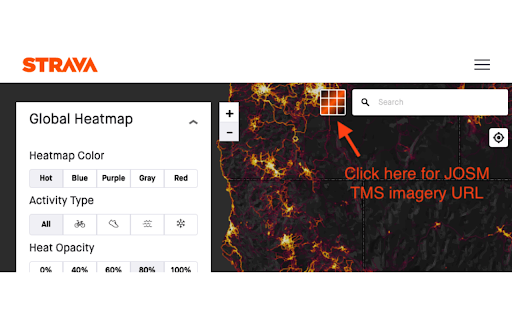
A browser extension that simplifies getting the TMS imagery url for using the Strava Heatmap in JOSM
This browser extension makes it easy to use the Strava Global Heatmap in JOSM, iD, and other mapping applications that support TMS imagery.
Accessing this imagery externally requires a set of key parameters that you obtain by signing into the Strava website, copying the values from several cookies, and then assembling into a query string at the end of the url. The keys expire after a week or so at which point you must repeat the process. This extension builds the url for you which makes this weekly process a bit less annoying.
Instructions
-------------------
1. Visit strava.com/heatmap and log in – sign up for a free account if you don't have one
2. Optional - Select the heatmap color and activity type you want to use
3. Click the button pictured below to get the TMS imagery url prepopulated with the required
`Key-Pair-Id`, `Policy`, and `Signature` parameters
4. Open the heatmap in your editor
- Click the appropriate button to open the heatmap in either JOSM or iD. For JOSM, Remote control must be enabled
- Alternatively you can copy the url (with or without the tms: prefix) and paste it into a custom imagery layer in you editor
Manually adding the imagery in JOSM
-------------------------------------------
Copy the url without the tms: prefix. Add a new TMS layer in the JOSM imagery preferences. Name it Strava Heatmap and paste in the copied url. If you are updating an expired Strava Heatmap layer you can just double-click it to replace url in the list view. In this case, copy the url with the tms: prefix as it is required here.
Manually adding the imagery in iD
------------------------------------
Copy the url without the tms: prefix. Open the Backgrounds panel and select "Custom" at the bottom. Paste the copied url into the Custom Background Settings window that opens.
| 分类 | 📝工作流程与规划 |
| 插件标识 | hicmfobjcbinceoeegookkgllpdgkcdc |
| 平台 | Chrome |
| 评分 |
☆☆☆☆☆
|
| 评分人数 | |
| 插件主页 | https://chromewebstore.google.com/detail/josm-strava-heatmap/hicmfobjcbinceoeegookkgllpdgkcdc |
| 版本号 | 25.2.3.0 |
| 大小 | 160KiB |
| 官网下载次数 | 2000 |
| 下载地址 | |
| 更新时间 | 2024-01-25 00:00:00 |
CRX扩展文件安装方法
第1步: 打开Chrome浏览器的扩展程序
第2步:
在地址栏输入: chrome://extensions/
第3步: 开启右上角的【开发者模式】
第4步: 重启Chrome浏览器 (重要操作)
第5步: 重新打开扩展程序管理界面
第6步: 将下载的crx文件直接拖入页面完成安装
注意:请确保使用最新版本的Chrome浏览器