
Tabpik Tab Manager - Beta Chrome 插件, crx 扩展下载


Prioritize and Organize your Browser Tabs with Style
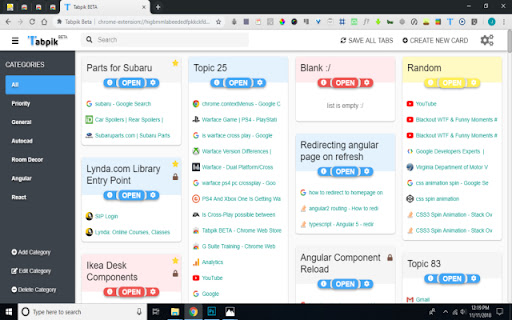
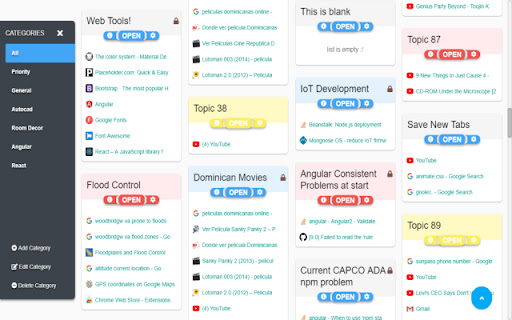
Tabpik is a tab manager that lets you organize your tabs by topics, with the purpose of continuing the use of those tabs across devices and for later use
▬▬ FEATURES ▬▬▬▬▬▬▬▬▬▬
- Cross Device Sync
- Prioritize content by topic and category
- Card skin change
- One click Go-to Tab
- Search Cards/Topics
- Lock and Favor cards for frequent use
▬▬ NOTE ▬▬▬▬▬▬▬▬▬▬
Tabpik does not save empty new tabs or chrome extension tabs
▬▬ KNOWN PROBLEMS ▬▬▬▬▬▬▬▬▬▬
- Options page is still under construction
- When returning from the options page to the dashboard, the menu icon does not close on click event
Problems? Questions? Suggestions?
Get In Touch
Email [email protected]
▬▬ PRIVACY NOTICE ▬▬▬▬▬▬▬▬▬▬
Tabpik is utilizing the chrome storage API to securely set users data private to they're browser or google account
▬▬ VERSION UPDATES ▬▬▬▬▬▬▬▬▬▬
v0.9.33 | 11.8.18
- 56% Performance Improvement
- Bug Fixes
v0.9.32 | 11.7.18
- Search Bar Integration
- "Save All Tabs" Navigation Button Integration
- Performance Improvements
- UI Improvements
- Bug Fixes
| 分类 | 📝工作流程与规划 |
| 插件标识 | higbmmlabeededfpkkckfdndjjadhafa |
| 平台 | Chrome |
| 评分 |
☆☆☆☆☆
|
| 评分人数 | |
| 插件主页 | https://chromewebstore.google.com/detail/tabpik-tab-manager-beta/higbmmlabeededfpkkckfdndjjadhafa |
| 版本号 | 1.5.7 |
| 大小 | 1.48MiB |
| 官网下载次数 | 8 |
| 下载地址 | |
| 更新时间 | 2019-05-26 00:00:00 |
CRX扩展文件安装方法
第1步: 打开Chrome浏览器的扩展程序
第2步:
在地址栏输入: chrome://extensions/
第3步: 开启右上角的【开发者模式】
第4步: 重启Chrome浏览器 (重要操作)
第5步: 重新打开扩展程序管理界面
第6步: 将下载的crx文件直接拖入页面完成安装
注意:请确保使用最新版本的Chrome浏览器