
Datto RMM UI Enhancer Chrome 插件, crx 扩展下载
Improves the Datto RMM (previously known as AEM) UI experience
Provides a few small enhancements to the Datto RMM (previously AEM) user interface.
Disclaimer: This extension is not affiliated or associated with Datto, Inc. in any way. It is an unofficial, third party browser extension made by a dRMM user. Use at your own risk.
-----
Features
- The Sites down menu does not truncate names and is longer, it also links to the Devices tab to each site instead of the Summary tab.
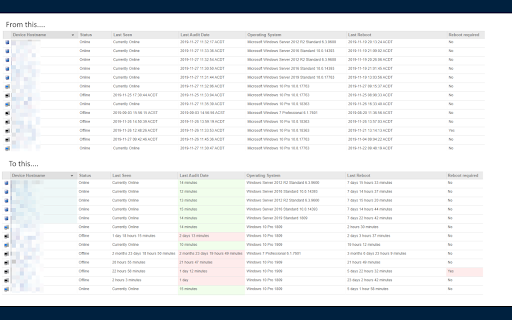
The Devices tab includes the bulk of the improvements
- Device Hostname column: Windows Servers have a light blue background
- Last Seen column: Replaces timestamp with age (example: 18 hours 27 minutes)
- Last Audit column: Background color based on audit age (Green to Red gradient) and replaces the timestamp with age (for example: 5 hours 22 minutes)
- Operating System Column: Replaces Windows 10 Build number (10.0.18362) with the friendlier and shorter version (1903)
- Operating System Column: Removes 'Microsoft' prefix from OS Names
- Last Reboot column: Replaces timestamp with age (for example: 15 days 17 hours 8 minutes)
- Reboot Required column: Red background if a reboot is pending
Quick Filter
The Search box has been improved and now also acts as a Quick Filter on the Devices page. Typing more than 2 characters into the Search box will instantly filter all devices to only show those that match the query.
Matches are done on any visible field/column, for example, you can query on hostname, IP, last user, OS, etc - whatever fields you have configured will be used for matching.
Partial matches also work, a query for sql will match srv-sql-01.
The search field still maintains its regular functionality.
| 分类 | 📝工作流程与规划 |
| 插件标识 | hipgdbnphembdgicadgomdoibpnppakd |
| 平台 | Chrome |
| 评分 |
☆☆☆☆☆
|
| 评分人数 | |
| 插件主页 | https://chromewebstore.google.com/detail/datto-rmm-ui-enhancer/hipgdbnphembdgicadgomdoibpnppakd |
| 版本号 | 25.2.3.0 |
| 大小 | 43.47KiB |
| 官网下载次数 | 220 |
| 下载地址 | |
| 更新时间 | 2021-12-21 00:00:00 |
CRX扩展文件安装方法
第1步: 打开Chrome浏览器的扩展程序
第2步:
在地址栏输入: chrome://extensions/
第3步: 开启右上角的【开发者模式】
第4步: 重启Chrome浏览器 (重要操作)
第5步: 重新打开扩展程序管理界面
第6步: 将下载的crx文件直接拖入页面完成安装
注意:请确保使用最新版本的Chrome浏览器