
Remember The Milk for Gmail Chrome 插件, crx 扩展下载
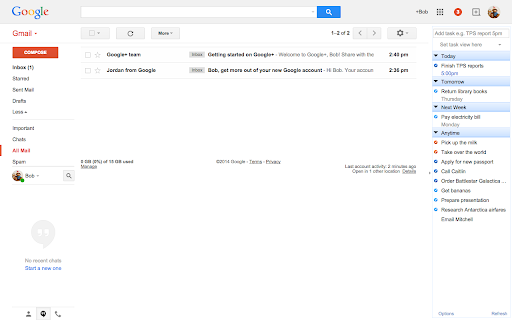
Task management goodness.
*Features*
- Manage your tasks in Gmail (complete, postpone, and edit tasks).
- Add new tasks (and connect them with your emails, contacts, and Google Calendar events).
- Automatically add tasks for starred messages or specific labels.
- For more info see: http://www.rememberthemilk.com/services/gmail/addon/features/
*Requirements*
- A Remember The Milk account (free).
- Your Gmail language setting must be US English (see Gmail settings).
*Support for Gmail changes*
Google often changes Gmail's code in ways that affect the functionality of this extension, requiring us to re-code and update our extension to support the new Gmail code. See our current support for various versions of Gmail's code: http://www.rememberthemilk.com/services/gmail/addon/status/
*Need help?*
- FAQ: http://www.rememberthemilk.com/services/gmail/addon/faq/
- Troubleshooting: http://www.rememberthemilk.com/services/gmail/addon/troubleshooting/
- Discussion Forums: http://www.rememberthemilk.com/forums/gmail/
- Help by Email: http://www.rememberthemilk.com/help/contact/support/?ctx=gmail
| 分类 | 📝工作流程与规划 |
| 插件标识 | hphjpfmagbhbdfhdndglcccmhdjhjjce |
| 平台 | Chrome |
| 评分 |
☆☆☆☆☆
|
| 评分人数 | |
| 插件主页 | https://chromewebstore.google.com/detail/remember-the-milk-for-gma/hphjpfmagbhbdfhdndglcccmhdjhjjce |
| 版本号 | 25.2.3.0 |
| 大小 | 15.56KiB |
| 官网下载次数 | 8000 |
| 下载地址 | |
| 更新时间 | 2014-12-17 00:00:00 |
CRX扩展文件安装方法
第1步: 打开Chrome浏览器的扩展程序
第2步:
在地址栏输入: chrome://extensions/
第3步: 开启右上角的【开发者模式】
第4步: 重启Chrome浏览器 (重要操作)
第5步: 重新打开扩展程序管理界面
第6步: 将下载的crx文件直接拖入页面完成安装
注意:请确保使用最新版本的Chrome浏览器