
Habitica Pomodoro SiteKeeper Chrome 插件, crx 扩展下载
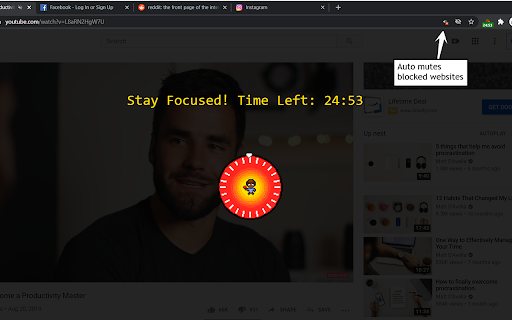
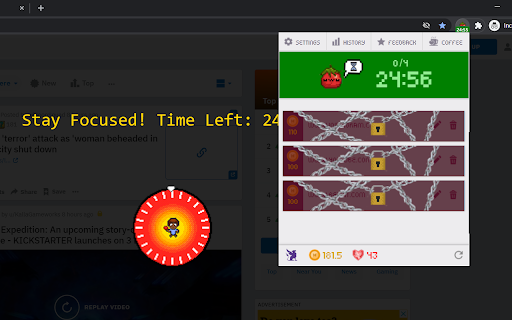

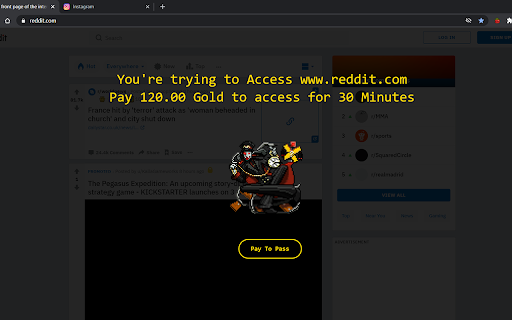

Pomodoro Timer and Site Blocker that Plugs into Habitica and turns your time-wasting navigation tendencies into rewards.
To report a bug or suggesting new features please use this link:
https://github.com/ofekmiz/Habitica-Pomodoro-SiteKeeper/issues
-----------------------------------------
This extension has two main features:
1."Pay to Pass" Website Blocker:
Website Blocker that plugs into Habitica and limits you from visiting websites that you decide. You can decide to visit these sites by spending Habitica currency, which you'll earn by developing good habits and doing chores.
2.Pomodoro Timer:
Including a Pomodoro Timer.
You can read about the pomodoro technique here:
https://habitica.fandom.com/wiki/Pomodoro
During Pomodoro mode, all websites in the list are blocked, websites with cost 0 are blocked only during pomodoro.
A Pomodoro habit is created automatically for the user in Habitica, with an option in the extension settings to automatically score [+] or [-] of the habit when a Pomodoro is done successfully or fails accordingly.
How to use:
After installing the extension, click on the icon at the top right to open the menu. In here, you must set your API Credentials. You can then block a site by navigating to it and clicking block site. It will ask you to enter a cost. From this point on, when you visit this site, the extension will ask you if you'd like to spend GP to access it. To start a pomodoro timer simply click on the Tomato character. Click again to stop the timer. In the settings you will find a lot of option that allow you tweak and change the pomodoro behavior to fit best for you.
-----------------------------------------
For more information, recommended settings and version update log:
https://habitica.fandom.com/wiki/Habitica_Pomodoro_SiteKeeper
| 分类 | 📝工作流程与规划 |
| 插件标识 | iaanigfbldakklgdfcnbjonbehpbpecl |
| 平台 | Chrome |
| 评分 |
☆☆☆☆☆
|
| 评分人数 | |
| 插件主页 | https://chromewebstore.google.com/detail/habitica-pomodoro-sitekee/iaanigfbldakklgdfcnbjonbehpbpecl |
| 版本号 | 3.5.3 |
| 大小 | 7.56MiB |
| 官网下载次数 | 10000 |
| 下载地址 | |
| 更新时间 | 2021-12-26 00:00:00 |
CRX扩展文件安装方法
第1步: 打开Chrome浏览器的扩展程序
第2步:
在地址栏输入: chrome://extensions/
第3步: 开启右上角的【开发者模式】
第4步: 重启Chrome浏览器 (重要操作)
第5步: 重新打开扩展程序管理界面
第6步: 将下载的crx文件直接拖入页面完成安装
注意:请确保使用最新版本的Chrome浏览器