
1-click Chrome 插件, crx 扩展下载

1-click access to institutional login page for full article
Does your work require you to look up academic journals online? If so, the sense of frustration at the cumbersome process of logging in to access a pay-walled resource may be all too familiar.
1-Click lives in your browser toolbar and provides easy access to full versions of articles. Note that you need to have already have institutional access to the journals in question - 1-Click does not provide unauthorised access to pay-walled content.
Instructions:
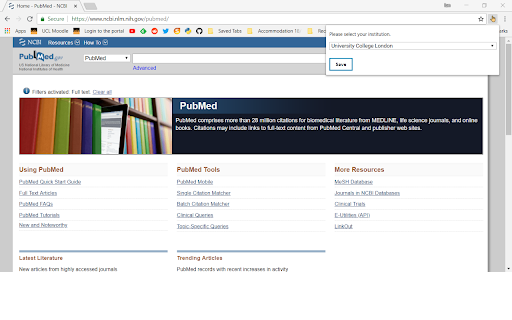
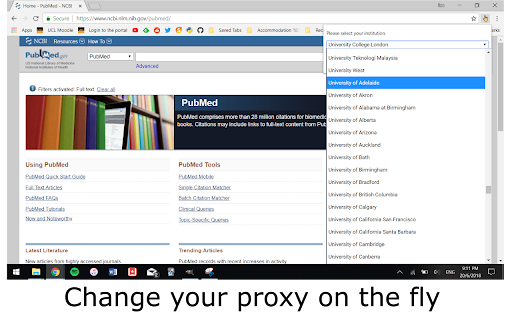
1. [Required only upon installation] Click on toolbar icon and select your institution from the dropdown list. Click 'save'.
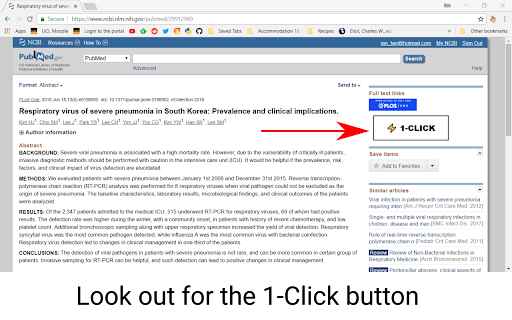
2. Search for articles as you normally would. When presented with incomplete article and asked to log in for access, look out for the '1-Click' button.
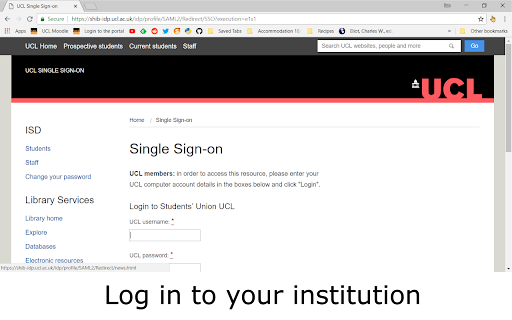
3. When presented with your institutional login page, fill in your credentials and proceed. And presto! You will be taken to the full article.
It works by prefixing the article URL with your institutional proxy URL, and if your institution has a valid subscription to the content, this takes you to the full version upon logging in.
Minimal setup is required, and you can change your institution proxy at any time by clicking on the toolbar icon. The extension remembers your most recently saved proxy and runs in the background every time you fire up your browser!
1-Click is perfect for you if you want a no-frills, stress-free experience while carrying our your research off-campus. Sometimes, cloud storage and markup tools aren't necessary - maybe like me, you already use other such services and don't want to disrupt your existing workflow - and all you need is quick access to the web page containing the full article.
Current supported journals and databases are: PubMed, ScienceDirect, Ovid, Nature, Springer, UpToDate, BMJ Journals, Wiley, Taylor & Francis Online, SAGE Journals, IEEE Xplore, Oxford University Press, Cambridge University Press, MIT Press, de Gruyter, ACS Publications.
For a list of supported institutional proxies, please visit EZProxy DB (link below).
Disclaimer: This extension does not store any passwords or collect user information.
If you have any suggestions or complaints, please email me at [email protected]. Any feedback is greatly appreciated!
Acknowledgements:
Proxy list taken from https://ezproxy-db.appspot.com/ by Tom Wambold.
Tap icon by Pixel perfect (https://www.flaticon.com/authors/pixel-perfect)
Document and wall icon by Freepik (https://www.flaticon.com/authors/freepik)
Changelog:
25/8/18: Fixed Nature button
| 分类 | 📝工作流程与规划 |
| 插件标识 | iaccghjomfhbhdeoeajgnijcgepocnjl |
| 平台 | Chrome |
| 评分 |
☆☆☆☆☆
|
| 评分人数 | |
| 插件主页 | https://chromewebstore.google.com/detail/1-click/iaccghjomfhbhdeoeajgnijcgepocnjl |
| 版本号 | 2.0 |
| 大小 | 23.81KiB |
| 官网下载次数 | 174 |
| 下载地址 | |
| 更新时间 | 2018-08-26 00:00:00 |
CRX扩展文件安装方法
第1步: 打开Chrome浏览器的扩展程序
第2步:
在地址栏输入: chrome://extensions/
第3步: 开启右上角的【开发者模式】
第4步: 重启Chrome浏览器 (重要操作)
第5步: 重新打开扩展程序管理界面
第6步: 将下载的crx文件直接拖入页面完成安装
注意:请确保使用最新版本的Chrome浏览器