
SkoolBot Classroom Assistant Chrome 插件, crx 扩展下载

Your simple-to-use dashboard for Google Classroom™
SkoolBot Classroom Assistant for Google Classroom™ is a free must-have tool for students and parents overwhelmed by the amount of information they receive every day from their school.
At SkoolBot, we love Google Classroom™! We just think students need a way to easily know when important things are happening, and to make sure they don't miss something critical.
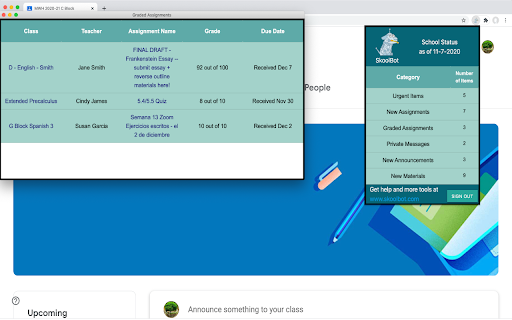
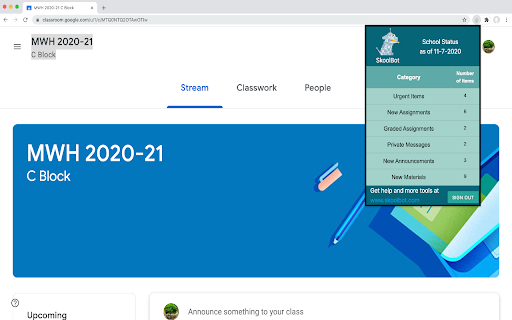
SkoolBot Classroom Assistant takes all the information you get, and organizes it into a one-click dashboard with simple, high-level categories:
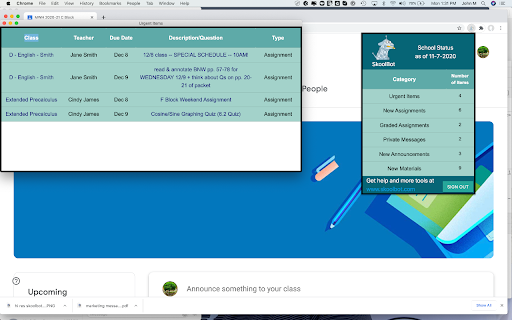
1. Urgent Items - Those things that are due today or tomorrow
2. New Assignments - All your homework and assignments due over the next 2 weeks
3. New Materials - New materials your teacher has posted for your class
4. New Questions - Questions posted by the teacher you need to answer
5. Graded Assignments - All the grades you received over the past week
6. Private Messages - Messages sent specifically to you from your teacher
7. New Announcements - Messages sent to the entire class
SkoolBot is accessible whenever you want.
Just click on the SkoolBot icon, and a summary window shows up with the number of items in each category. Click on a category, and a detailed window show up with all the specific assignments, grades, messages, etc. for you to view. A click on any one of those items pulls you right into Google Classroom™, showing the specific assignment, etc.
It's that simple!
SkoolBot Classroom Assistant is always watching out for you. If we find anything important, a red "!" will appear on the SkoolBot icon, telling you to click on it to see what's up.
Privacy and security is important to us at SkoolBot. All your school information is kept on your machine. We don't see it. That's the way it should be - it's your private stuff.
Don't get lost in the avalanche of information from your school. Focus on what matters. That's how to do better at school each and every day.
Let us help you manage your schoolwork. Start using SkoolBot Classroom Assistant today! Did we mention that it's FREE???
Google Classroom is a trademark of Google Inc.
Use of this trademark is subject to Google Permissions.
| 分类 | 📝工作流程与规划 |
| 插件标识 | ichcfkcpdckccielflilndofiokfgamd |
| 平台 | Chrome |
| 评分 |
☆☆☆☆☆
|
| 评分人数 | |
| 插件主页 | https://chromewebstore.google.com/detail/skoolbot-classroom-assist/ichcfkcpdckccielflilndofiokfgamd |
| 版本号 | 1.2.1 |
| 大小 | 1.28MiB |
| 官网下载次数 | 163 |
| 下载地址 | |
| 更新时间 | 2021-10-15 00:00:00 |
CRX扩展文件安装方法
第1步: 打开Chrome浏览器的扩展程序
第2步:
在地址栏输入: chrome://extensions/
第3步: 开启右上角的【开发者模式】
第4步: 重启Chrome浏览器 (重要操作)
第5步: 重新打开扩展程序管理界面
第6步: 将下载的crx文件直接拖入页面完成安装
注意:请确保使用最新版本的Chrome浏览器