
Amazon BSR & Rating Colorizer Chrome 插件, crx 扩展下载
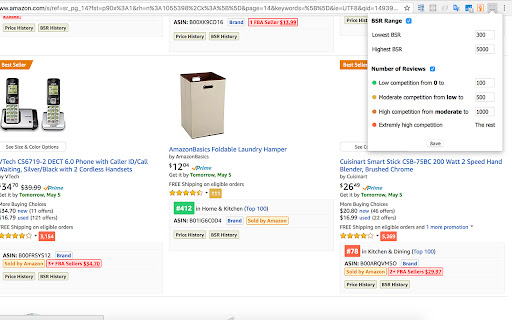
Color codes BSR and ratings on Amazon
** NEW **
Added support for new Amazon sites.
This plugin extends the plugin 'DS Amazon Quick View Extended' by adding colorized BSR numbers based on your desired BSR range.
* Now also color codes ratings.
* Possible to disable and enable features.
Feel free to report bugs and feature request when reviewing the extension.
IMPORTANT!! To use this extension you need to:
* Have 'DS Amazon Quick View Extended' installed
* After installation enter a BSR Range by pressing the extension icon
Enjoy!
| 分类 | 📝工作流程与规划 |
| 插件标识 | iffmfknpimppjfoionhiffohdljiedai |
| 平台 | Chrome |
| 评分 |
☆☆☆☆☆
|
| 评分人数 | |
| 插件主页 | https://chromewebstore.google.com/detail/amazon-bsr-rating-coloriz/iffmfknpimppjfoionhiffohdljiedai |
| 版本号 | 25.2.3.0 |
| 大小 | 41.87KiB |
| 官网下载次数 | 10000 |
| 下载地址 | |
| 更新时间 | 2022-02-22 00:00:00 |
CRX扩展文件安装方法
第1步: 打开Chrome浏览器的扩展程序
第2步:
在地址栏输入: chrome://extensions/
第3步: 开启右上角的【开发者模式】
第4步: 重启Chrome浏览器 (重要操作)
第5步: 重新打开扩展程序管理界面
第6步: 将下载的crx文件直接拖入页面完成安装
注意:请确保使用最新版本的Chrome浏览器