
Social Fixer for Facebook Chrome 插件, crx 扩展下载

Social Fixer for Facebook lets you filter your news feed, hide things you don't want to see, and more!
Please visit http://SocialFixer.com for a full list of features and documentation.
Social Fixer is filled with features to make your Facebook experience better.
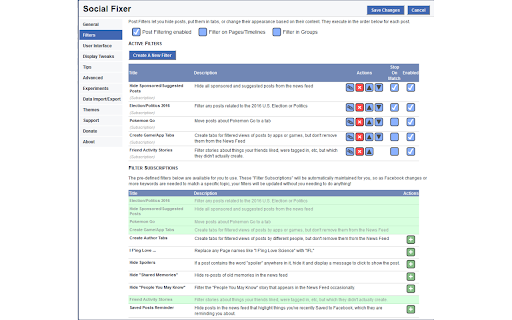
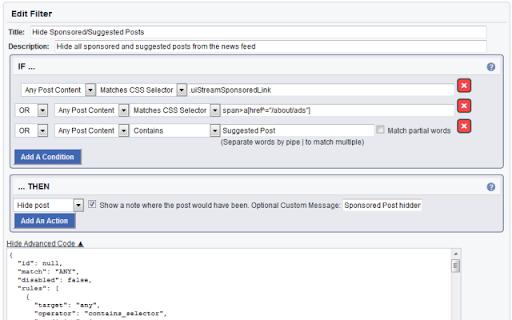
Filter posts in the news feed by content, author, link url, and more
Built-in Filter Subscriptions let you just pick a filter and use it without knowing how it works.
Pre-defined filters include hiding Sponsored Posts, Political posts, things your friends like, and much more.
Hide posts you've read and are done with, so they don't appear in the news feed anymore.
Select from a list of Display Tweaks to customize the interface, or write your own with CSS.
Force FB to stay on the Most Recent feed
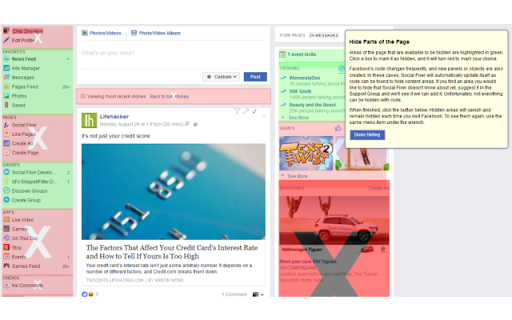
Hide parts of the page you don't want to see, like panels in the left or right columns.
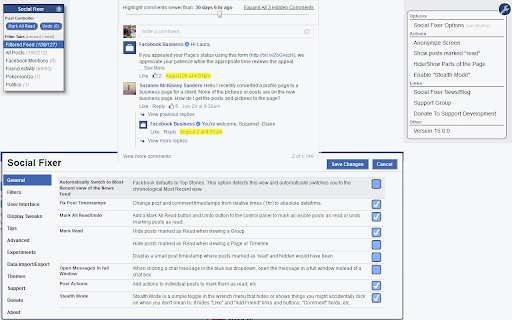
Comment Navigator lets you expand all comments and replies to a post, and highlight comments that are older than an age you specify.
Stealth Mode hides Like buttons, Comment areas, etc so you can browse Facebook without accidentally interacting with posts you don't intend to.
Show full timestamps on posts, rather than relative times like "1 hr ago".
Anonymize for screenshots with one click - hide friend names, group names, profile pictures, etc. If you want to share a conversation or screenshot but not your privacy, anonymize first.
Filters and Tweaks are updated regularly and automatically available to you to use without any additional work. Features will be added continuously to make your Facebook experience as great as possible!
| 分类 | 👥社交 |
| 插件标识 | ifmhoabcaeehkljcfclfiieohkohdgbb |
| 平台 | Chrome |
| 评分 |
☆☆☆☆☆
|
| 评分人数 | |
| 插件主页 | https://chromewebstore.google.com/detail/social-fixer-for-facebook/ifmhoabcaeehkljcfclfiieohkohdgbb |
| 版本号 | 31.1.0 |
| 大小 | 213KiB |
| 官网下载次数 | 100000 |
| 下载地址 | |
| 更新时间 | 2023-09-09 00:00:00 |
CRX扩展文件安装方法
第1步: 打开Chrome浏览器的扩展程序
第2步:
在地址栏输入: chrome://extensions/
第3步: 开启右上角的【开发者模式】
第4步: 重启Chrome浏览器 (重要操作)
第5步: 重新打开扩展程序管理界面
第6步: 将下载的crx文件直接拖入页面完成安装
注意:请确保使用最新版本的Chrome浏览器