
Roamit Chrome 插件, crx 扩展下载
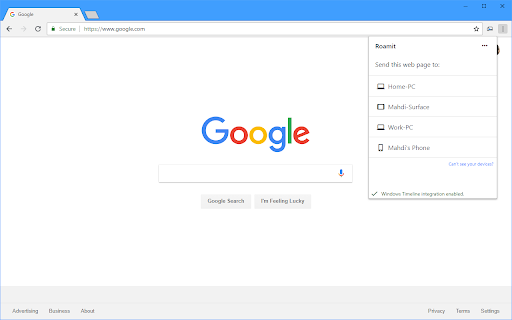
Integrate Chrome with Windows Timeline, and send links to your Android or Windows phone quickly.
► Share the webpage you're reading to your other devices* and continue there with just a click!
► Integrate Chrome with Windows Timeline, and have your browsing activity history there automatically on all of your Windows 10 devices. (This feature is optional and can be disabled)
○ Link sharing works on Chrome on Windows, Mac and Linux.
○ Uploading activity to Windows Timeline works on all operating systems as well, but viewing activities is only available on Windows 10 devices.
* Your Windows devices will need to be signed in with the same Microsoft account, and your Android devices will need to have Roamit app installed from Google Play Store.
| 分类 | 📝工作流程与规划 |
| 插件标识 | ighnlholdodepefajbkbjcedobmggmlk |
| 平台 | Chrome |
| 评分 |
☆☆☆☆☆
|
| 评分人数 | |
| 插件主页 | https://chromewebstore.google.com/detail/roamit/ighnlholdodepefajbkbjcedobmggmlk |
| 版本号 | 25.2.3.0 |
| 大小 | 125KiB |
| 官网下载次数 | 775 |
| 下载地址 | |
| 更新时间 | 2018-08-21 00:00:00 |
CRX扩展文件安装方法
第1步: 打开Chrome浏览器的扩展程序
第2步:
在地址栏输入: chrome://extensions/
第3步: 开启右上角的【开发者模式】
第4步: 重启Chrome浏览器 (重要操作)
第5步: 重新打开扩展程序管理界面
第6步: 将下载的crx文件直接拖入页面完成安装
注意:请确保使用最新版本的Chrome浏览器