
Live Bookmarks Chrome 插件, crx 扩展下载

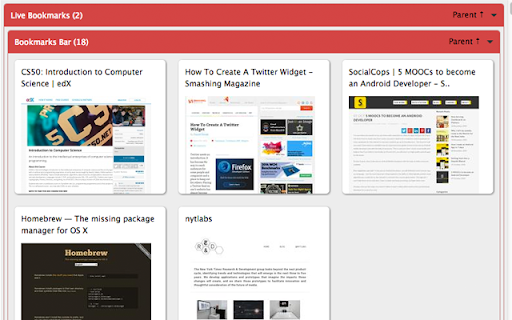
A bookmark viewer to see all your bookmarks with screenshot of the webpage.
It's ok if you can't remember title of the webpage you just added in your long list of bookmarks as long as you know how the webpage looks like. With live bookmarks you can not only see the title of the webpage but also a thumbnail of the website next to it. Enjoy!
Features:
- View all bookmarks categorized by folder
- Live thumbnail of each bookmark
- Click on the bookmark and open webpage
- Share bookmarks on social media with single click
Support this extension: https://donorbox.org/to-sustain-building-google-chrome-extensions
V-1.1:
- View bookmarks in full screen
V-1.2:
- User friendly folder collapse
V-1.3:
- Search bookmarks
- Delete folders
- Delete bookmarks
V-1.4:
- Load thumbnails only when needed
- Load thumbnails smoothly
v-1.5:
- Load only visible thumbnails
v-1.5.2:
- Separated Total Bookmarks and Total Folders numbers
v-1.5.3:
- Updated thumbnail library
How to:
- Click on the title or thumbnail of the webpage to open a webpage
- Click the triangle next on right side of any folder name to toggle visibility of the bookmarks under a particular folder
- Click "Parent" to go to the parent folder
- Click social media icon on a bookmark to share the webpage on social media
| 分类 | ♿无障碍访问 |
| 插件标识 | ihfolgbjkckclahmpoejnoglilaeenji |
| 平台 | Chrome |
| 评分 |
☆☆☆☆☆
|
| 评分人数 | |
| 插件主页 | https://chromewebstore.google.com/detail/live-bookmarks/ihfolgbjkckclahmpoejnoglilaeenji |
| 版本号 | 2.0.0 |
| 大小 | 827KiB |
| 官网下载次数 | 529 |
| 下载地址 | |
| 更新时间 | 2019-01-05 00:00:00 |
CRX扩展文件安装方法
第1步: 打开Chrome浏览器的扩展程序
第2步:
在地址栏输入: chrome://extensions/
第3步: 开启右上角的【开发者模式】
第4步: 重启Chrome浏览器 (重要操作)
第5步: 重新打开扩展程序管理界面
第6步: 将下载的crx文件直接拖入页面完成安装
注意:请确保使用最新版本的Chrome浏览器