
RunMyCode Online Chrome 插件, crx 扩展下载
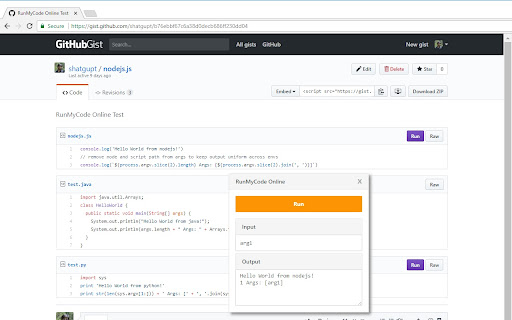
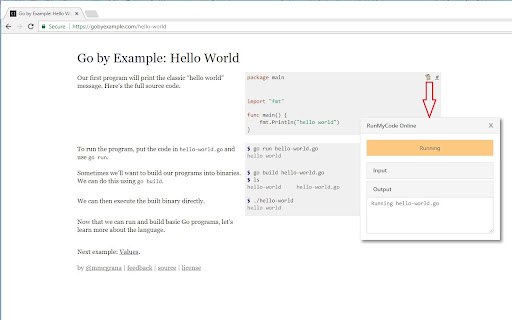

RunMyCode Online is a free and open-source tool to compile and run code online directly from Github, Gitlab and Bitbucket.
How to Use:
1. Install the extension.
2. On extension install, [RunMyCode Online](https://runmycode.online) will open in a new tab and prompt you to authenticate to get a key.
3. On authenticating with any the of providers, you will be redirected to dashboard page and extension will be auto-configured with your key.
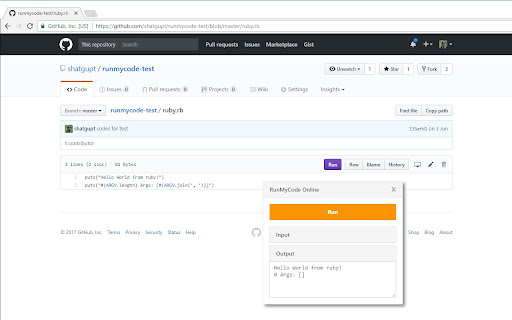
4. Now you can go to any supported language code page on supported website and you will see a colored `Run` button added to left of usual action buttons (see screenshot). For example, you can test the extension with this Ruby code - https://github.com/shatgupt/runmycode-test/blob/master/ruby.rb
5. Clicking that `Run` button will open a runner where you can input any command line args and then press the big orange `Run` button to run the code on the page.
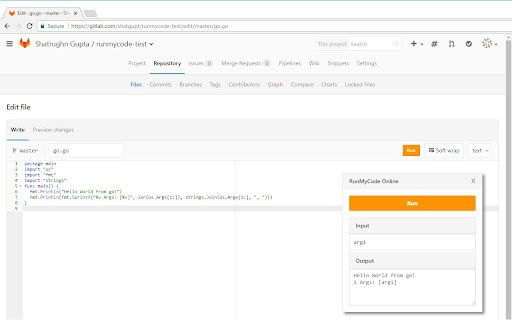
6. You can also edit the code using the web editor on Github or Gitlab and make it run through the same `Run` button as above.
Supported Languages: https://runmycode.online/faq.html#supported-lang
Supported Websites: https://runmycode.online/faq.html#supported-sites
Permissions requested by Extension:
Starting with v2, RMCO only asks permission for GitHub by default. All other websites are optional and can be allowed on demand. (Check your URL/Tool bar for a blue RMCO icon on supported sites)
1. Optional permission for the above supported websites to allow extension to run code directly from there
2. runmycode.online - To auto-configure the extension
3. api.runmycode.online - To run code from the extension
4. Tabs - For detecting url change and page loading complete for single page apps like Github, Bitbucket
5. Storage - To store API URL and Key
FAQ: https://runmycode.online/faq.html
Any more questions? Email to [email protected]
Source Code available at: https://github.com/shatgupt/runmycode-ext
| 分类 | 💻开发者工具 |
| 插件标识 | iidcnkpdmnopbbkdmneglbelcefgfohf |
| 平台 | Chrome |
| 评分 |
☆☆☆☆☆
|
| 评分人数 | |
| 插件主页 | https://chromewebstore.google.com/detail/runmycode-online/iidcnkpdmnopbbkdmneglbelcefgfohf |
| 版本号 | 8.3 |
| 大小 | 28.87KiB |
| 官网下载次数 | 1000 |
| 下载地址 | |
| 更新时间 | 2019-03-24 00:00:00 |
CRX扩展文件安装方法
第1步: 打开Chrome浏览器的扩展程序
第2步:
在地址栏输入: chrome://extensions/
第3步: 开启右上角的【开发者模式】
第4步: 重启Chrome浏览器 (重要操作)
第5步: 重新打开扩展程序管理界面
第6步: 将下载的crx文件直接拖入页面完成安装
注意:请确保使用最新版本的Chrome浏览器