
HashMask Chrome 插件, crx 扩展下载
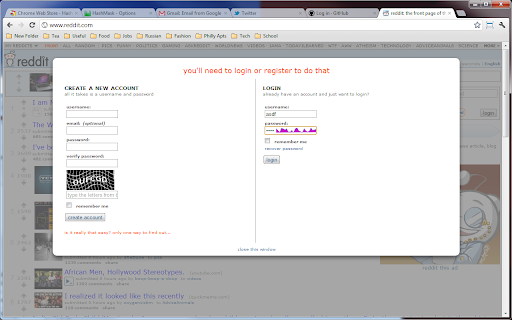

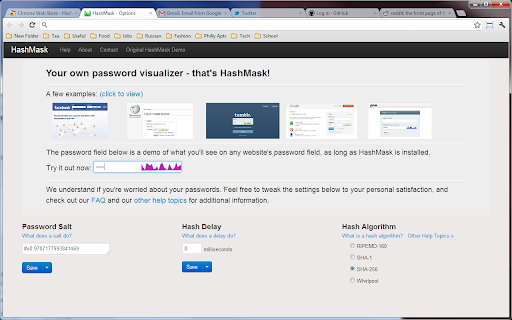
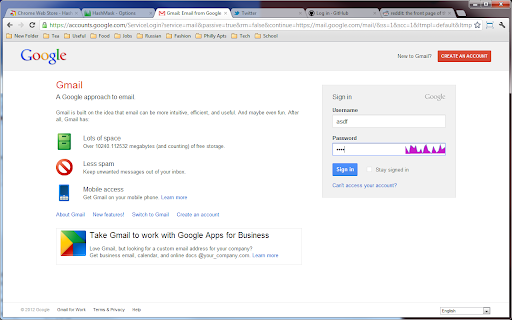
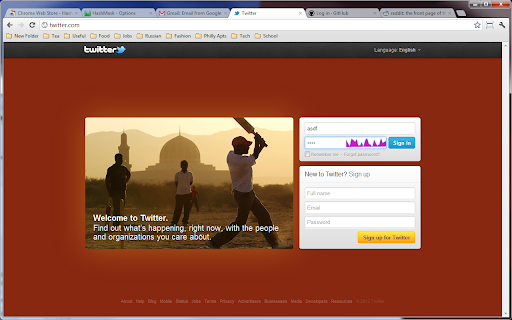
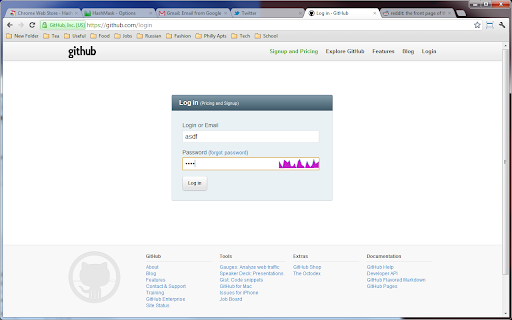
Secure password visualization for Chrome.
---- Short Changelog ----
v1.2:
Added toolbar button to turn on/off quickly
Fixed issue with showing HashMask wrongly
v1.1:
Better random salt generation.
Fixed issue with small password fields.
A full changelog can be found here: http://goo.gl/MFpuE
-------------------------------
HashMask is a browser extension meant to enhance your password fields, its home is here: http://goo.gl/g5rIF
HashMask is meant to help prevent some errors when logging into various websites. It does this by giving you a consistent sparkline representing your passwords. On any site you visit with a password field, start typing, and a little colored sparkline will appear. This is your clue - try and remember something about the color, shape, or both. Before you know it, your login error rate will drop immensely.
Of course, it's just an aid - if you can't remember all your sparklines, don't worry about it! It's just a visual aid. Use it, or not, however you want. Perhaps only remembering one or two really important sparklines for a password you forget or mistype often would be useful, or perhaps you can try to remember all of them. Either way, it's up to you.
Inspired by this demo: http://goo.gl/2To7k
| 分类 | 📝工作流程与规划 |
| 插件标识 | iijmhgjmfjnibiehilcmbbjffcmgolhn |
| 平台 | Chrome |
| 评分 |
☆☆☆☆☆
|
| 评分人数 | |
| 插件主页 | https://chromewebstore.google.com/detail/hashmask/iijmhgjmfjnibiehilcmbbjffcmgolhn |
| 版本号 | 25.2.3.0 |
| 大小 | 280KiB |
| 官网下载次数 | 96 |
| 下载地址 | |
| 更新时间 | 2012-06-16 00:00:00 |
CRX扩展文件安装方法
第1步: 打开Chrome浏览器的扩展程序
第2步:
在地址栏输入: chrome://extensions/
第3步: 开启右上角的【开发者模式】
第4步: 重启Chrome浏览器 (重要操作)
第5步: 重新打开扩展程序管理界面
第6步: 将下载的crx文件直接拖入页面完成安装
注意:请确保使用最新版本的Chrome浏览器