
Twitch Live Chrome 插件, crx 扩展下载
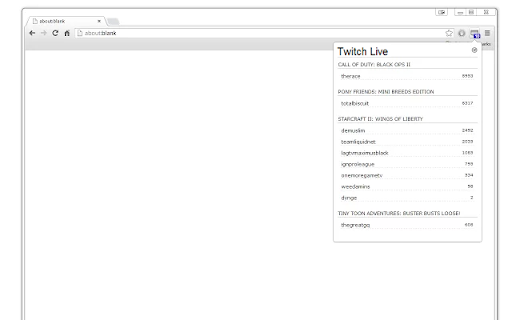
Twitch TV extension for displaying a user's favorite channels which are currently live.
Twitch Live
Twitch TV extension for displaying a user's favorite channels which are currently live.
NOTE: Version 2.0.1 is a beta. Please report any issues.
Twitch Live is a browser extension for Google Chrome that makes it easy to check which of your favorite Twitch.tv channels are currently live. You can also configure the extension to send you a notification when one of your favorite streams goes online.
Extension was developed by Mike Chambers. Design by Ben Griffith.
Once the extension has been installed it will place a small monitor / TV icon on the top right of your browser window. NOTE YOU MUST NOW PIN THE EXTENSION IN CHROME IN ORDER TO SEE THE ICON. Open the options tab by right clicking the icon, and selecting options. Once the options tab is open, enter your Twitch.tv user name, and click save.
You can then view which of your favorite Twitch.tv streams are online by clicking the Twitch Live icon in the browser window.
This extension was originally part of the JTV Live extension for Justin.tv but has been split off into its own extension.
Release History
2.0.2 BETA (3.7.22)
* Fixed issue with login not working
2.0.1 BETA (3.6.22)
* Updated to work with new Twitch APIs
* Extension now requires login
* Major refactor. Please report any issues
* Removed VOD filtering (no longer supported by Twitch API)
* No longer show notifications on new streams (simplifying extension to make easier to maintain)
1.90 (10.21.2020)
* Format viewer counts to be easier to read.
1.89 (10.2.2020)
* Fixed an issue that caused duplicate stream entries (due to Twitch API bug).
1.88 (9.20.2020)
* Fixed an issue that prevented user name from being stored on new installs (dues to Twitch API change).
1.87 (7.28.2019)
* Fixed a bug where data would not be loaded automatically when entering account name.
* Added an about page, which can be accessed by right clicking on the extension icon.
1.86 (7.28.2019)
* Fixed bug where data wouldnt load unless you resaved settings.
1.85 (7.28.2019)
* Pretty big code updated and refactoring
* Updated Twitch API to v5
* Mousing over a stream will show a tool tip with current stream title
* Can now click Twitch Live text at top of window to go to main twitch page
0.98 (7.23.2018)
* Fixed issue when clicking game titles that contained a single quote in their name. (thanks JS for reporting)
0.97 (4.12.2018)
* Fixed issue where extension would not work for some users (due to bug in Twitch API). Thanks LurkinLurker for the help in tracking down.
0.96 (4.02.2018)
* Fixed issue where vodcasts were not recognized
0.95 (8.28.2017)
* Added option to not display vodcasts
* Vodcasts are displayed in a lighter grey
* Removed request for "tabs" permissions (no longer needed)
0.94 (5.31.2017)
* Fixed issue with Twitch API change that prevented all live streams from displaying.
0.93 (1.6.2017)
* Fixed issue with Twitch API change that limited results to 25 streams.
0.92 (9.15.2016)
* Added client_id to API requests to twitch to fix bug that broke extension.
0.91 (2.15.2014)
* Added option to open stream in a popout window.
0.90 (10.02.2013)
* Rewrote Notification support.
* Notifications now require Google Chrome 28 or higher.
* Notifications now automatically close after 7 seconds.
0.89 (08.21.2013)
* Section / game titles are now clickable. Clicking will open a new tab pointing to the Twitch.tv page for the game.
0.88 (07.08.2013)
* General stability improvements when working with Twitch TV API.
0.87 (06.17.2013)
* Fixed an issue where clicking on a channel would not work if previous api call had failed.
* Some minor user interface tweaks.
* Some minor code optimizations.
0.86 (06.06.2013)
* Fixed issue where wrong results are returned if user is not following any channels.
0.85 (06.06.2013)
* Initial Release.
| 分类 | 👥社交 |
| 插件标识 | iiljidcefnbhbpamageahhblhbbhhopm |
| 平台 | Chrome |
| 评分 |
☆☆☆☆☆
|
| 评分人数 | |
| 插件主页 | https://chromewebstore.google.com/detail/twitch-live/iiljidcefnbhbpamageahhblhbbhhopm |
| 版本号 | 2.0.2 |
| 大小 | 57.4KiB |
| 官网下载次数 | 20000 |
| 下载地址 | |
| 更新时间 | 2022-03-09 00:00:00 |
CRX扩展文件安装方法
第1步: 打开Chrome浏览器的扩展程序
第2步:
在地址栏输入: chrome://extensions/
第3步: 开启右上角的【开发者模式】
第4步: 重启Chrome浏览器 (重要操作)
第5步: 重新打开扩展程序管理界面
第6步: 将下载的crx文件直接拖入页面完成安装
注意:请确保使用最新版本的Chrome浏览器