
Title - host Chrome 插件, crx 扩展下载
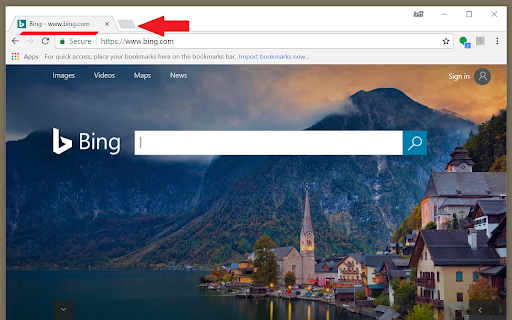
This extension changes the tab title to include the host. Make Chrome fully compatible with KeePass autotype.
Don't worry about your privacy, full code is below.
v1.1.2 Added manifest short_name. Improved description.
v1.1.1 Continue checking for dirty title for entire time on webpage. This improves compatibility with sites like Gmail who change the title every time an email is clicked.
v1.1.0 Refined code to fix hard to change site titles. Code runs asynchronously in background. Checks every second for fifteen seconds.
function sleep(ms) {
return new Promise(resolve => setTimeout(resolve, ms));
}
async function titlehost() {
while(true)
{
Log('checked');
if(IsTitleDirty())
ChangeTitle();
await sleep(1000);
}
}
function IsTitleDirty() {
return (!GetTitle().endsWith(GetHost()));
}
function ChangeTitle() {
document.title = GetTitle() + ' - ' + GetHost();
Log('changed');
}
function GetTitle() {
return document.title;
}
function GetHost() {
return location.host;
}
function Log(message) {
return console.log('Title - host> ' + message);
}
titlehost();
| 分类 | 📝工作流程与规划 |
| 插件标识 | ijgmehophgjjjhipcmcfblojkekdecfo |
| 平台 | Chrome |
| 评分 |
☆☆☆☆☆
|
| 评分人数 | |
| 插件主页 | https://chromewebstore.google.com/detail/title-host/ijgmehophgjjjhipcmcfblojkekdecfo |
| 版本号 | 25.2.3.0 |
| 大小 | 50.55KiB |
| 官网下载次数 | 55 |
| 下载地址 | |
| 更新时间 | 2017-11-02 00:00:00 |
CRX扩展文件安装方法
第1步: 打开Chrome浏览器的扩展程序
第2步:
在地址栏输入: chrome://extensions/
第3步: 开启右上角的【开发者模式】
第4步: 重启Chrome浏览器 (重要操作)
第5步: 重新打开扩展程序管理界面
第6步: 将下载的crx文件直接拖入页面完成安装
注意:请确保使用最新版本的Chrome浏览器