
Tabulazer - Table Filter and Sorter Chrome 插件, crx 扩展下载
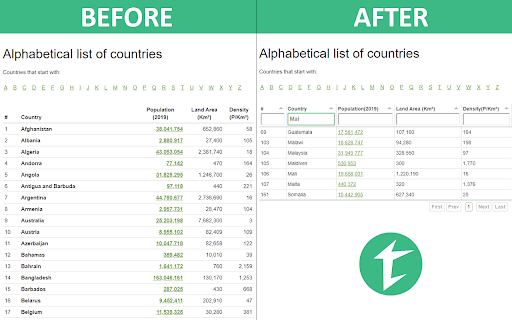
Filter, sort, page and style any existing HTML table using the Tabulator JS library.
Do you work with websites featuring a lot of HTML tables? Would you like to filter, sort and/or page them? If so, then this lightweight extension might be useful.
You can use it to transform any standard table into a fully-featured interactive table with the following features:
➤ Real-time column sorting (and reverse sorting)
➤ Real-time column filtering (using full-text search)
➤ Width enlarge to 100% (to increase readability)
➤ Dynamic paging (useful for very long tables)
➤ Resizable columns (using mouse handlers)
➤ Copy & Paste support with CSV/Excel/Google Sheets support (using CTRL+C)
... and more!
Highly recommended if you're dealing with big tables and need to quickly extract relevant data from them.
--------------------------------------------------------------------
CONFIGURATION SETTINGS
--------------------------------------------------------------------
By clicking on the top-right button you'll access the configuration settings, where you'll be able to set the following options:
➤ Force table width to 100%. When enabled, the plugin will enlarge any HTML table to 100% width, thus taking all the available space on your browser. If the table is wrapped by other HTML container elements, those will also be enlarged/set to 100% in order to accomodate the table. If you don't want all this to happen, just keep it disabled.
➤ Enable sorting. Enable it to add sorting and reverse-sorting capabilities to all the HTML table columns: both can be activated by clicking (and double-clicking) to the column header itself.
➤ Enable filtering. Enable it to add filtering capabilities to all the HTML table columns: the filter will look like a standard HTML textbox that, if non-empty, will automatically update the table content, filtering out all the rows not containing the given text within that column.
➤ Enable paging. Enable it to add paging capabilities to the HTML table: notice that the filtering and sorting capabilities won't be affected by that (they will always take all rows into account).
--------------------------------------------------------------------
USAGE INFO
--------------------------------------------------------------------
Once you've set these options, right-click to a HTML table within any HTML page and select the Tabulazer context menu item to "tabulaze" it.
The transformation is done using Tabulator (http://tabulator.info/), a great table management JS library by Oli Folkerd.
➤ Tabulazer official page: https://www.ryadel.com/en/tabulazer-chrome-extension-filter-sort-html-table-tables/
➤ Fork me on GitHub: https://github.com/Darkseal/tabulazer
| 分类 | 📝工作流程与规划 |
| 插件标识 | ikfbkffbgkdghhnjfoomdkeifljlepah |
| 平台 | Chrome |
| 评分 |
☆☆☆☆☆
|
| 评分人数 | |
| 插件主页 | https://chromewebstore.google.com/detail/tabulazer-table-filter-an/ikfbkffbgkdghhnjfoomdkeifljlepah |
| 版本号 | 25.2.3.0 |
| 大小 | 1.22MiB |
| 官网下载次数 | 2000 |
| 下载地址 | |
| 更新时间 | 2019-10-06 00:00:00 |
CRX扩展文件安装方法
第1步: 打开Chrome浏览器的扩展程序
第2步:
在地址栏输入: chrome://extensions/
第3步: 开启右上角的【开发者模式】
第4步: 重启Chrome浏览器 (重要操作)
第5步: 重新打开扩展程序管理界面
第6步: 将下载的crx文件直接拖入页面完成安装
注意:请确保使用最新版本的Chrome浏览器