
Kickstarter Easy Reply Chrome 插件, crx 扩展下载
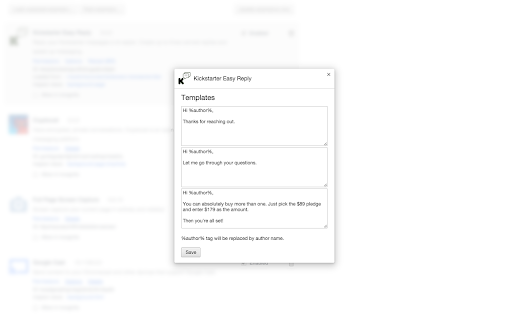
Reply your Kickstarter messages a lot easier. Create up to three canned replies and speed up messaging.
Reply your Kickstarter messages a lot easier. Create up to three canned replies and speed up messaging.
This is a simple, yet very powerful extension for managing your Kickstarter campaigns.
Create up to three canned responses and speed up replying to you messages.
It can also automatically insert the recipient name into your messages.
Upon installation go to extensions (either by typing chrome://extensions, or clicking the menu button then settings and then extensions) and click on Options in Kickstarter Easy Reply. There you define your canned replies.
And then you'll see them every time you reply to someone.
Enjoy faster messaging and focus on your awesome campaign!
| 分类 | 📝工作流程与规划 |
| 插件标识 | ilmnonjnjlbfggoijlpajbebdjcgeode |
| 平台 | Chrome |
| 评分 |
☆☆☆☆☆
|
| 评分人数 | |
| 插件主页 | https://chromewebstore.google.com/detail/kickstarter-easy-reply/ilmnonjnjlbfggoijlpajbebdjcgeode |
| 版本号 | 1.0.5 |
| 大小 | 16.48KiB |
| 官网下载次数 | 56 |
| 下载地址 | |
| 更新时间 | 2016-02-20 00:00:00 |
CRX扩展文件安装方法
第1步: 打开Chrome浏览器的扩展程序
第2步:
在地址栏输入: chrome://extensions/
第3步: 开启右上角的【开发者模式】
第4步: 重启Chrome浏览器 (重要操作)
第5步: 重新打开扩展程序管理界面
第6步: 将下载的crx文件直接拖入页面完成安装
注意:请确保使用最新版本的Chrome浏览器