
9gag Tag Manager Chrome 插件, crx 扩展下载
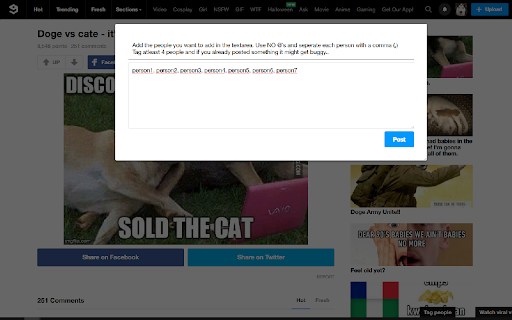
Easily tag any amount of people on 9gag. First version, so bound to be a bit buggy.
This plugin adds a button in the lower right corner; [Tag People]
Click it, follow instructions and tag loads off people.
UPDATE 0.5:
-FUNCTIONALITY UPDATE
-Added a toggleable nightmode
-Added the functionality to save lists to fasten the workflow!
UPDATE 0.4:
-Fix for the new 9gag update requiring text being added for tags to be posted
UPDATE 0.3:
-ADDED A SEARCH COMMENTS OPTION!
-Added an option for slower computers/connection. If you have issues with people not getting tagged in a reply but in a separate comment you might want to try to turn on this option (the whole tagging process becomes slower)
-You can now close the popup by clicking next to it
-Added a warning about the dangers of tagging to many people at once (if you have more information about this I would love to hear from you)
Might be buggy, so any kind of feedback would be greatly appreciated!
| 分类 | ♿无障碍访问 |
| 插件标识 | ilpgedelemhiojnjmkcmaijjpaelckab |
| 平台 | Chrome |
| 评分 |
☆☆☆☆☆
|
| 评分人数 | |
| 插件主页 | https://chromewebstore.google.com/detail/9gag-tag-manager/ilpgedelemhiojnjmkcmaijjpaelckab |
| 版本号 | 2.19.1 |
| 大小 | 56.45KiB |
| 官网下载次数 | 6 |
| 下载地址 | |
| 更新时间 | 2017-05-21 00:00:00 |
CRX扩展文件安装方法
第1步: 打开Chrome浏览器的扩展程序
第2步:
在地址栏输入: chrome://extensions/
第3步: 开启右上角的【开发者模式】
第4步: 重启Chrome浏览器 (重要操作)
第5步: 重新打开扩展程序管理界面
第6步: 将下载的crx文件直接拖入页面完成安装
注意:请确保使用最新版本的Chrome浏览器