
WordFinder Chrome 插件, crx 扩展下载
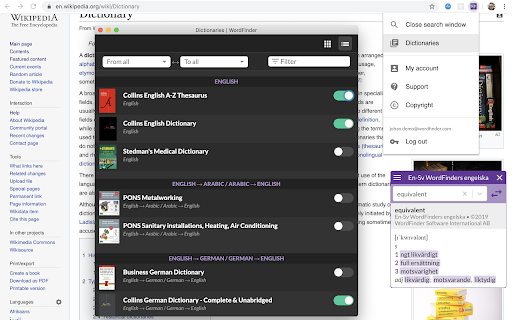

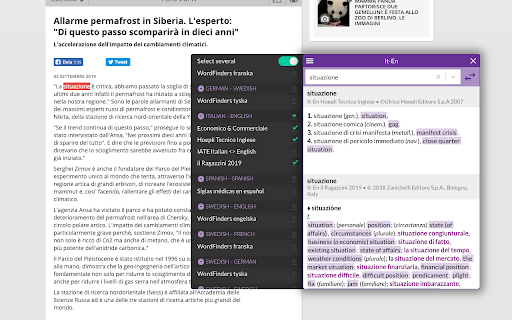
Look up words in WordFinder’s dictionaries directly from any web site.
Please note: This is an add-on to the WordFinder dictionary service. If you are not yet a subscriber, head over to www.wordfinder.com! You can try it 7 days for free.
WordFinder is the leading dictionary service that gives you the words you want anywhere, anytime. This Chrome extension gives you the ability to instantly look up words in hundreds of dictionaries directly from any web site.
WordFinder is always there when you need it. You can use any of the following methods to look up words:
• Right-click on a word on the web page and look it up from the context menu.
• Hold down CTRL (or ⌘ on a Mac) and double-click on the word you want to look up.
• Or simply enter your word directly in the WordFinder search window. Suggested words from your selected dictionary (or dictionaries!) will appear instantly as you type.
Hold down CTRL (or ⌘ on a Mac) while double-clicking on a translation to insert it in the latest text editing field on the current web page! A single click on a translation will copy it to the clipboard.
WordFinder Unlimited features literally hundreds of dictionaries! Open the menu by clicking on the WordFinder icon in the task bar and go the dictionary page. There you can select only the dictionaries that you are interested in.
While you are working with the WordFinder search window, instantly switch between your selected dictionaries from the dictionary menu, which appears when you click on the “hamburger menu” (three horizontal lines, in the title bar of the WordFinder search window).
We look forward to hearing from you! If you discover a web site where the WordFinder Chrome extension does not work as expected, or have other suggestions or questions, please don’t hesitate to contact us at www.wordfinder.com/support. Our developers are actively working on adding new features and adapting the extension to different user needs.
| 分类 | 🛠️工具 |
| 插件标识 | ioanocinpfgampobfhpajpojecdjnnno |
| 平台 | Chrome |
| 评分 |
☆☆☆☆☆
|
| 评分人数 | |
| 插件主页 | https://chromewebstore.google.com/detail/wordfinder/ioanocinpfgampobfhpajpojecdjnnno |
| 版本号 | 0.15.1 |
| 大小 | 1.77MiB |
| 官网下载次数 | 2000 |
| 下载地址 | |
| 更新时间 | 2020-10-17 00:00:00 |
CRX扩展文件安装方法
第1步: 打开Chrome浏览器的扩展程序
第2步:
在地址栏输入: chrome://extensions/
第3步: 开启右上角的【开发者模式】
第4步: 重启Chrome浏览器 (重要操作)
第5步: 重新打开扩展程序管理界面
第6步: 将下载的crx文件直接拖入页面完成安装
注意:请确保使用最新版本的Chrome浏览器