
DevTools Theme: Atom Dark with Green Cursor Chrome 插件, crx 扩展下载

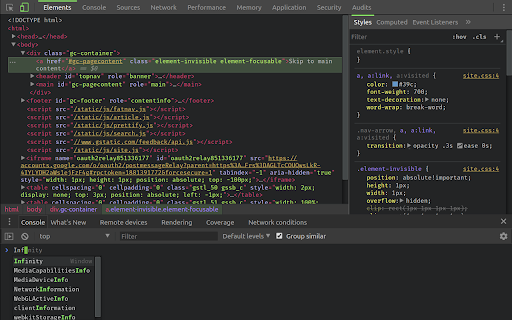
A highly customized dark theme for Devtools with a blinking green cursor in the console.
This is an experimental theme for the Chrome Developer Tools that utilizes DevTools Experiments flag within Chrome.
// INSTALL INSTRUCTIONS
1. Install this theme extension.
2. Open chrome://flags/#enable-devtools-experiments
3. Locate and enable "Enable Developer Tools experiments".
4. Select "Relaunch Now" at the bottom of the page (WARNING: this will restart Chrome).
5. Open DevTools > Settings
6. Select Experiments tab, and check 'Allow custom UI themes'.
7. Select Preferences Tab, and selected Theme: Dark.
7. Reload DevTools.
// FAQ
> Does it really have a blinking cursor, like an old school terminal?
Indeed it does. See https://www.youtube.com/watch?v=A7dXmUAPtPA for example.
> What is theme based on?
The excellent work of Maurice Cruz' zero-base-themes (https://github.com/mauricecruz/zero-base-themes) and Marvin R' vscode-theme-dark-atom-dark-green-cursor (https://github.com/therealmarv/vscode-theme-dark-atom-dark-green-cursor).
> Where can I contribute?
All the code is licensed MIT on Github: https://github.com/justinribeiro/chrome-devtools-theme-atom-dark-green-cursor/
| 分类 | 💻开发者工具 |
| 插件标识 | iocojmginfolhoaalkgabkmilfepnejc |
| 平台 | Chrome |
| 评分 |
☆☆☆☆☆
|
| 评分人数 | |
| 插件主页 | https://chromewebstore.google.com/detail/devtools-theme-atom-dark/iocojmginfolhoaalkgabkmilfepnejc |
| 版本号 | 8.3 |
| 大小 | 33.4KiB |
| 官网下载次数 | 354 |
| 下载地址 | |
| 更新时间 | 2018-05-26 00:00:00 |
CRX扩展文件安装方法
第1步: 打开Chrome浏览器的扩展程序
第2步:
在地址栏输入: chrome://extensions/
第3步: 开启右上角的【开发者模式】
第4步: 重启Chrome浏览器 (重要操作)
第5步: 重新打开扩展程序管理界面
第6步: 将下载的crx文件直接拖入页面完成安装
注意:请确保使用最新版本的Chrome浏览器