
Automated Flash Site Enabler (Lite) Chrome 插件, crx 扩展下载
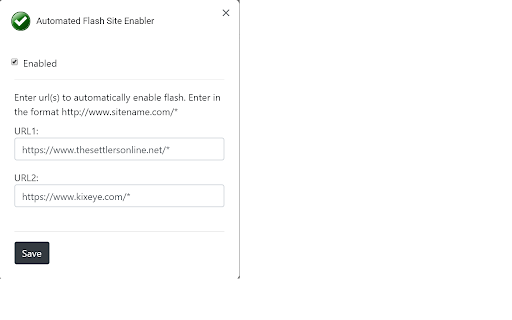
Allow the configured flash enabled site(s) to launch by default in Chrome version 69 and above.
Note: As of October 2020, a Chrome update appears to be forcing the need to manually allow a site to run flash every time the browser is restarted. If a work around can be found, a new version will be published. In the near future, it is expected that Flash will be permanently blocked by Chrome given the sunset announcement.
This extension allows one or two URLs to be configured to automatically allow flash to run without popups/user intervention.
The URLs of game sites are defaulted and provided as an example of a format. Different URLs should be entered in the format http://www.sitename.com/*
This is the "Lite" version of the extension and is free for use.
A "Pro" version is available which allows configuration of more than two URLs and is available for a modest fee. See the extension popup menu or options page for a link to "Pro".
If you like the "Lite" version and would like to make a donation that would be appreciated as well. A donation may be made by using the Donate button on the options page.
Note: It has been reported that the extension does not work under Incognito mode even if the extension is properly enabled for Incognito. At this point, be advised that this extension does not allow flash to be enabled under Incognito mode. If an update is identified, a new version will be published.
Version Notes:
v1.0.4.0
- Updated default site list
v1.0.3.0
- Corrected problem where removed sites were still flash enabled
v1.0.2.1
- updated site link on options page
If you encounter any problems using this extension or have suggestions for improvements please let me know.
| 分类 | 📝工作流程与规划 |
| 插件标识 | ioiijepglemgcpdkjjefkchhdcofebpl |
| 平台 | Chrome |
| 评分 |
☆☆☆☆☆
|
| 评分人数 | |
| 插件主页 | https://chromewebstore.google.com/detail/automated-flash-site-enab/ioiijepglemgcpdkjjefkchhdcofebpl |
| 版本号 | 25.2.3.0 |
| 大小 | 399KiB |
| 官网下载次数 | 10000 |
| 下载地址 | |
| 更新时间 | 2020-11-19 00:00:00 |
CRX扩展文件安装方法
第1步: 打开Chrome浏览器的扩展程序
第2步:
在地址栏输入: chrome://extensions/
第3步: 开启右上角的【开发者模式】
第4步: 重启Chrome浏览器 (重要操作)
第5步: 重新打开扩展程序管理界面
第6步: 将下载的crx文件直接拖入页面完成安装
注意:请确保使用最新版本的Chrome浏览器