
Twitch clip/VOD sync Chrome 插件, crx 扩展下载
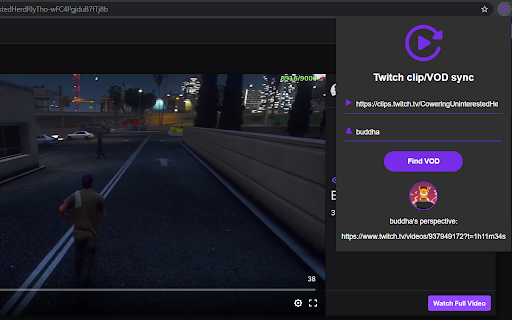
Synchronises a Twitch clip/VOD to another streamers VOD if that streamer was live at the exact moment in time of the clip/VOD.
You can use this extension anywhere as long as you provide a valid clip/VOD URL. If you have a clip/VOD open in your current tab, the extension will automatically fill in the URL field for you.
Valid clip URLs examples
https://clips.twitch.tv/ObliqueOddCougarFunRun-GF9H5eK6aSyFbT8U
clips.twitch.tv/ObliqueOddCougarFunRun-GF9H5eK6aSyFbT8U
twitch.tv/lirik/clip/EphemeralMuddyPanPeteZarollTie-D-ojcu-Nk40osS0S
Valid VOD URLs examples
VOD URLs must always include a timestamp with hours, minutes and seconds, even if they are 0.
https://www.twitch.tv/videos/934247376?t=10h29m46s
www.twitch.tv/videos/934247376?t=0h15m12s
twitch.tv/videos/934247376?t=1h0m10s
| 分类 | 👥社交 |
| 插件标识 | iolfhmhipbbpacmhhffkjelgkadnffid |
| 平台 | Chrome |
| 评分 |
☆☆☆☆☆
|
| 评分人数 | |
| 插件主页 | https://chromewebstore.google.com/detail/twitch-clipvod-sync/iolfhmhipbbpacmhhffkjelgkadnffid |
| 版本号 | 1.0.4 |
| 大小 | 2.7MiB |
| 官网下载次数 | 2000 |
| 下载地址 | |
| 更新时间 | 2021-06-07 00:00:00 |
CRX扩展文件安装方法
第1步: 打开Chrome浏览器的扩展程序
第2步:
在地址栏输入: chrome://extensions/
第3步: 开启右上角的【开发者模式】
第4步: 重启Chrome浏览器 (重要操作)
第5步: 重新打开扩展程序管理界面
第6步: 将下载的crx文件直接拖入页面完成安装
注意:请确保使用最新版本的Chrome浏览器