
RT Video Finder Chrome 插件, crx 扩展下载
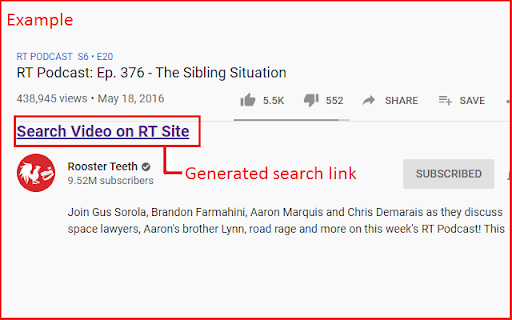
Generates a link on YouTube's video watch page to quickly search the video on the main Rooster Teeth site.
This extension is active on all YouTube pages, but only does something when on a YouTube video watch page for a Rooster Teeth associated channel. For such a watch page, the extension generates a link and adds it just below the video, above the channel name and video description. The link goes to the Rooster Teeth website's search page with the title of the YouTube video already entered.
Due to some variation in video titles and how Rooster Teeth's search function works, you may have to modify the search query slightly to get to the desired video. For example, searching the YouTube video "RT Podcast: Ep. 376 - The Sibling Situation" on the Rooster teeth site won't return any results, as "RT Podcast" isn't part of the title on the Rooster Teeth site, but simply cutting it down to "The Sibling Situation" will return the appropriate video.
| 分类 | 🛠️工具 |
| 插件标识 | jbbdekbpldfflccgdedkocambafajilj |
| 平台 | Chrome |
| 评分 |
☆☆☆☆☆
|
| 评分人数 | |
| 插件主页 | https://chromewebstore.google.com/detail/rt-video-finder/jbbdekbpldfflccgdedkocambafajilj |
| 版本号 | 1.0 |
| 大小 | 18.22KiB |
| 官网下载次数 | 38 |
| 下载地址 | |
| 更新时间 | 2021-05-05 00:00:00 |
CRX扩展文件安装方法
第1步: 打开Chrome浏览器的扩展程序
第2步:
在地址栏输入: chrome://extensions/
第3步: 开启右上角的【开发者模式】
第4步: 重启Chrome浏览器 (重要操作)
第5步: 重新打开扩展程序管理界面
第6步: 将下载的crx文件直接拖入页面完成安装
注意:请确保使用最新版本的Chrome浏览器