
Minute: Meeting Notes and Actions Chrome 插件, crx 扩展下载
Official Minute Chrome extension for Google Calendar
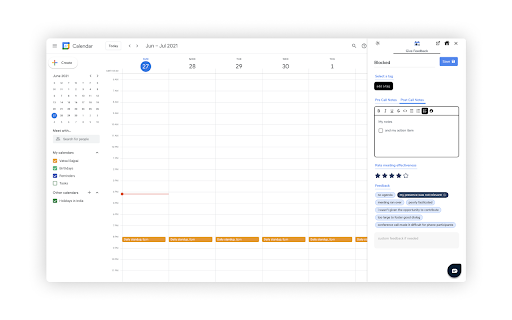
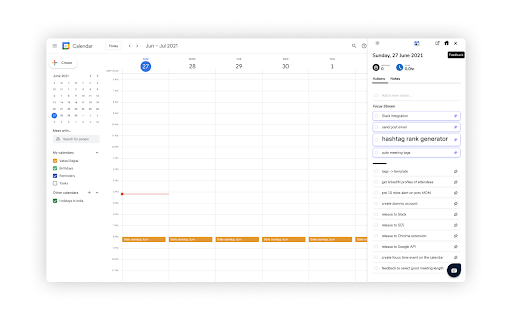
Minute is the fastest way to have meetings. Using Minute Chrome extension you can easily take meeting notes, agendas, tasks, follow-ups without leaving your Google Calendar.
Features:
?Take pre-call and post-call meeting notes in the extension directly. Send the notes to your team in a single click.
⭐ Provide quick feedback or rate meetings to help your teammates get a better understanding of their meetings.
?️ Organise your meetings into tags to get better analytics of your meetings and take actions on those metrics.
✔️ Connect your Gmail and Slack tasks into Minute and easily complete all pending tasks with reminders.
?How to use Minute:
1. Signup via Google Authentication on https://dash.getminute.co
2. Connect your Google Calendar
3. Download the Minute Chrome Extension
4. Start organising your meetings, take notes and other productivity tools :)
Check out more at https://getminute.com
| 分类 | 📝工作流程与规划 |
| 插件标识 | jdapmmpmeaipcjemhjakkmlpojhdggci |
| 平台 | Chrome |
| 评分 |
☆☆☆☆☆
|
| 评分人数 | |
| 插件主页 | https://chromewebstore.google.com/detail/minute-meeting-notes-and/jdapmmpmeaipcjemhjakkmlpojhdggci |
| 版本号 | 1.5.0 |
| 大小 | 206KiB |
| 官网下载次数 | 42 |
| 下载地址 | |
| 更新时间 | 2021-07-31 00:00:00 |
CRX扩展文件安装方法
第1步: 打开Chrome浏览器的扩展程序
第2步:
在地址栏输入: chrome://extensions/
第3步: 开启右上角的【开发者模式】
第4步: 重启Chrome浏览器 (重要操作)
第5步: 重新打开扩展程序管理界面
第6步: 将下载的crx文件直接拖入页面完成安装
注意:请确保使用最新版本的Chrome浏览器