
JIRALyzer for JIRA Chrome 插件, crx 扩展下载
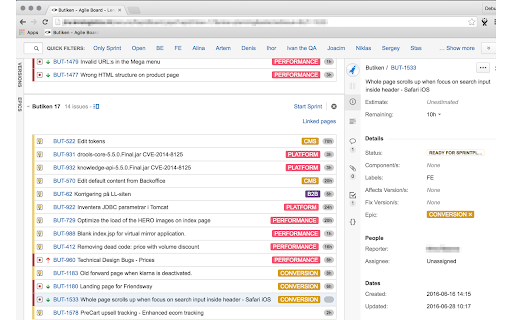
Atlassian JIRA on steroids!
JIRALyzer for Atlassian JIRA - will make your life as a Manager, Scrum Master or Project Manager easier and more productive.
In your JIRA instance:
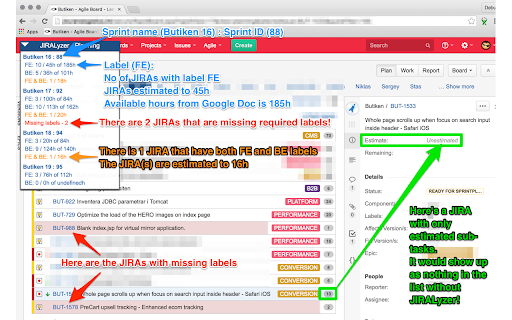
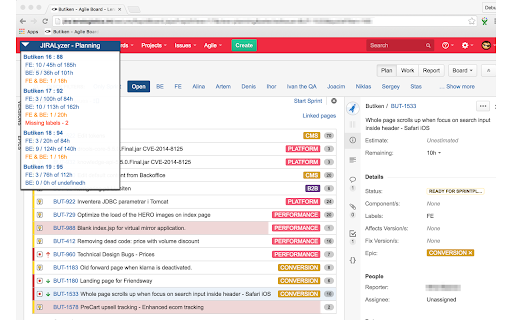
- Get an dynamic and instant overview over the workload in all created sprints.
- Integrates with Google Sheets to fetch amount of available hours for your team
- Get an immediate overview of the JIRA:s that are missing required labels.
- Get an immediate overview of the JIRA:s that have both labels to ease in estimation or work.
- Drag & drop and collapsible popup.
More to come!
- Get dynamically updated stats of the work distribution of labels.
- Track logged hours easily within the sprints.
Tested in JIRA 6.38 - 7.2.3 but should work in most versions of JIRA.
- Fixed problem with wrong total time when having large sprints - 50+ JIRAs, not the maximum limit of items in a sprint can be 1000 (limitation of JIRA).
- Now stores the state and position of the popup
- Added a loading animation
| 分类 | 📝工作流程与规划 |
| 插件标识 | jdnccmbjgbbgakepgebkncajeobgbpme |
| 平台 | Chrome |
| 评分 |
☆☆☆☆☆
|
| 评分人数 | |
| 插件主页 | https://chromewebstore.google.com/detail/jiralyzer-for-jira/jdnccmbjgbbgakepgebkncajeobgbpme |
| 版本号 | 25.2.3.0 |
| 大小 | 3.89MiB |
| 官网下载次数 | 154 |
| 下载地址 | |
| 更新时间 | 2017-04-21 00:00:00 |
CRX扩展文件安装方法
第1步: 打开Chrome浏览器的扩展程序
第2步:
在地址栏输入: chrome://extensions/
第3步: 开启右上角的【开发者模式】
第4步: 重启Chrome浏览器 (重要操作)
第5步: 重新打开扩展程序管理界面
第6步: 将下载的crx文件直接拖入页面完成安装
注意:请确保使用最新版本的Chrome浏览器