
Disable Slack Wysiwyg Chrome 插件, crx 扩展下载
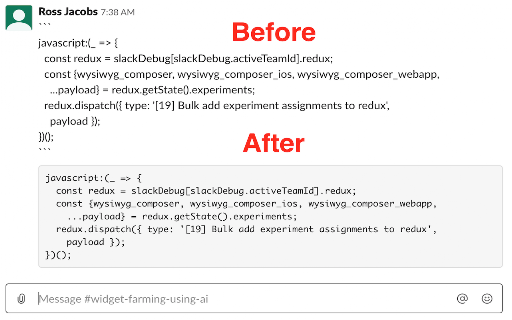
Disables Slack Wysiwyg 'Feature'. Based on Kevin Fahy's script at https://github.com/kfahy/slack-disable-wysiwyg-bookmarklet.
UPDATE (2019-12-18): The script this extension is based on no longer works (as of Slack version hash 0756f06a6f0457de4e355149a4321a9abb8befa5). For more information (or to help fix this), read the issue: https://github.com/kfahy/slack-disable-wysiwyg-bookmarklet/issues/27.
Disables Slack's new wysiwyg text editor.
Slack used to have the ability to use markdown in their text. They changed this permanently for all users without the ability to go back. Per Arthur O’Dwyer on his blog entry that was posted on Hacker News (https://quuxplusone.github.io/blog/2019/11/20/slack-rich-text-box/, 2019-11-20):
>>> Slack has just recently rolled out a “WYSIWYG text input” widget to its Web browser interface. (Apparently, the phased rollout started at the beginning of November 2019, but it’s just now starting to hit the workspaces that I participate in.) The user experience of using this new input method is really, really, really bad.
Kevin Fahy created a short script that allows users to disable the new wysiwyg editor (https://github.com/kfahy/slack-disable-wysiwyg-bookmarklet).
This extension is adapted from that script: Github: https://github.com/pocc/no-wysiwyg. To see it in action, look at the screenshot.
Inspired by the Hacker News articles: https://news.ycombinator.com/item?id=21589647, https://github.com/kfahy/slack-disable-wysiwyg-bookmarklet
| 分类 | 💻开发者工具 |
| 插件标识 | jenojkbpialbgpbgokiakifhpmoponjn |
| 平台 | Chrome |
| 评分 |
☆☆☆☆☆
|
| 评分人数 | |
| 插件主页 | https://chromewebstore.google.com/detail/disable-slack-wysiwyg/jenojkbpialbgpbgokiakifhpmoponjn |
| 版本号 | 8.3 |
| 大小 | 13.41KiB |
| 官网下载次数 | 33 |
| 下载地址 | |
| 更新时间 | 2019-12-21 00:00:00 |
CRX扩展文件安装方法
第1步: 打开Chrome浏览器的扩展程序
第2步:
在地址栏输入: chrome://extensions/
第3步: 开启右上角的【开发者模式】
第4步: 重启Chrome浏览器 (重要操作)
第5步: 重新打开扩展程序管理界面
第6步: 将下载的crx文件直接拖入页面完成安装
注意:请确保使用最新版本的Chrome浏览器