
Email Meter — Custom Signature Chrome 插件, crx 扩展下载
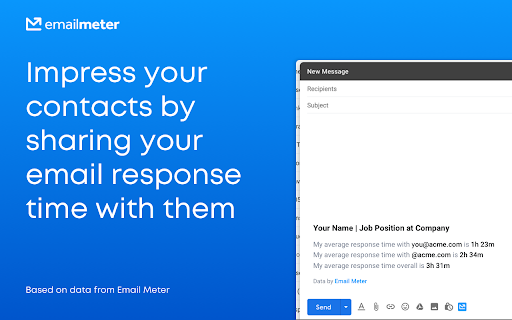
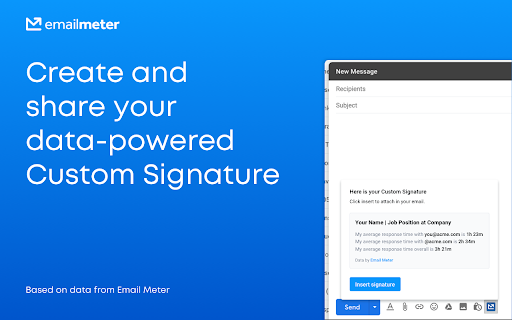
Add a signature to your emails based on personalized data and impress your contacts!
Impress your clients and co-workers with a data-powered email signature!
Why use Email Meter’s Custom Signatures?
Gain immediate trust from clients and co-workers by displaying your average response time. They’ll be confident of a quick reply.
Notify clients and co-workers of the best time to email you by including the day and time that you respond quickest to emails.
They’re quick and easy to generate. Just go to Gmail and click on the Email Meter button followed by “Insert Signature”. We’ll calculate your email stats with the recipients and generate your Custom Signature in a matter of minutes.
They’re fully customizable and whether or not you include the signature is always optional. You can save your name and job title so you don’t need to enter it each time. Your signature comes in HTML, making it straightforward to edit as you see fit.
We’re in beta stage so your feedback is invaluable to us, it’s how we improve! Send us an email at [email protected].
*IMPORTANT*: Email Meter and this extension work exclusively with Gmail™
----------------------------------------------------
To start using this extension and get your data-powered email signatures, you’ll need to log in or sign up to Email Meter.
Email Meter is free to use. It calculates relevant stats to equip you with invaluable insights into your email usage that help improve your productivity. You can measure workload, response times and plan your email schedule.
Email Meter can’t access the body or attachments of your emails, our service uses email metadata only. Find out more about Email Meter here: https://emailmeter.com
----------------------------------------------------
By using this extension, you agree to the Email Meter Terms & Conditions available at http://www.emailmeter.com/terms-of-service
Disclaimer:
This extension uses Google Analytics to collect extension usage statistics to help improve user experience. If you want to opt-out of Google Analytics tracking, please visit http://tools.google.com/dlpage/gaoptout or you can set up a filter in Adblock Plus or similar ad blocker tools like AdBlock, uBlock or Adblock Pro.
| 分类 | 📝工作流程与规划 |
| 插件标识 | jgffdfnjjdggdfceegfjdapnjkbjfmca |
| 平台 | Chrome |
| 评分 |
☆☆☆☆☆
|
| 评分人数 | |
| 插件主页 | https://chromewebstore.google.com/detail/email-meter-—-custom-sign/jgffdfnjjdggdfceegfjdapnjkbjfmca |
| 版本号 | 25.2.3.0 |
| 大小 | 118KiB |
| 官网下载次数 | 347 |
| 下载地址 | |
| 更新时间 | 2021-03-31 00:00:00 |
CRX扩展文件安装方法
第1步: 打开Chrome浏览器的扩展程序
第2步:
在地址栏输入: chrome://extensions/
第3步: 开启右上角的【开发者模式】
第4步: 重启Chrome浏览器 (重要操作)
第5步: 重新打开扩展程序管理界面
第6步: 将下载的crx文件直接拖入页面完成安装
注意:请确保使用最新版本的Chrome浏览器