
Hidden Message Chrome 插件, crx 扩展下载

Handy tool to have hidden conversation with your friend, without other knowing the message if they don't have the secret key.
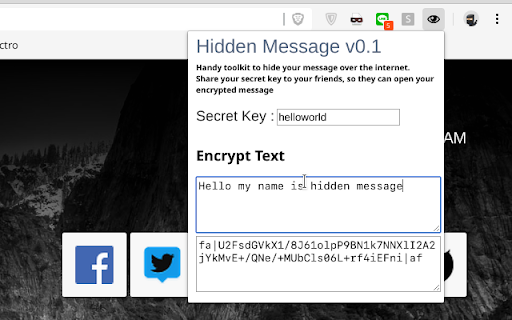
Hidden Message provided an AES encryption and auto decryption message on the website that contain generated code from Hidden Message.
You can have hidden conversation with your friend without other knowing the message, if they don't have the same secret key as you do. Share your secret key to your friends you want to communicate with.
How To Use ?
- Enter your secret key on provided box
- Type your message and will automatically generated encrypted text
- Copy and paste the encrypted text, for example to create facebook status or comments, or you can tweet it.
- People without this extension cannot see the hidden message
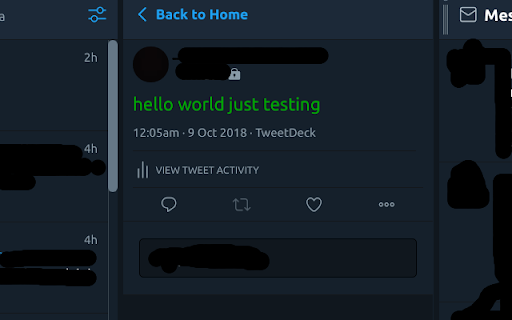
- People with this extension and with the correct key can unlock and read the hidden message.
- All successfully decrypted code will turn to green, if it's red, then you got the wrong secret key :)
PS. YOUR DATA IS SAFE, NO SPYING CODE IN THIS EXTENSION. YOU CAN CHECK IT YOURSELF ON THE SOURCE CODE BELOW
https://github.com/felangga/Hidden-Message
Currently Supported websites:
- Facebook (buggy on comments)
- Twitter (Tweetdeck)
Any comments or ideas or critics are open to my email [email protected]
Credits :
Icons made by Icomoon from Flaticon licensed by creativecommons.org
| 分类 | 👥社交 |
| 插件标识 | jimnbnahkjabkhbmhmochinegmlbcbbm |
| 平台 | Chrome |
| 评分 |
☆☆☆☆☆
|
| 评分人数 | |
| 插件主页 | https://chromewebstore.google.com/detail/hidden-message/jimnbnahkjabkhbmhmochinegmlbcbbm |
| 版本号 | 3.128.4 |
| 大小 | 44.58KiB |
| 官网下载次数 | 122 |
| 下载地址 | |
| 更新时间 | 2018-10-17 00:00:00 |
CRX扩展文件安装方法
第1步: 打开Chrome浏览器的扩展程序
第2步:
在地址栏输入: chrome://extensions/
第3步: 开启右上角的【开发者模式】
第4步: 重启Chrome浏览器 (重要操作)
第5步: 重新打开扩展程序管理界面
第6步: 将下载的crx文件直接拖入页面完成安装
注意:请确保使用最新版本的Chrome浏览器