
Employee Time Tracker Chrome 插件, crx 扩展下载
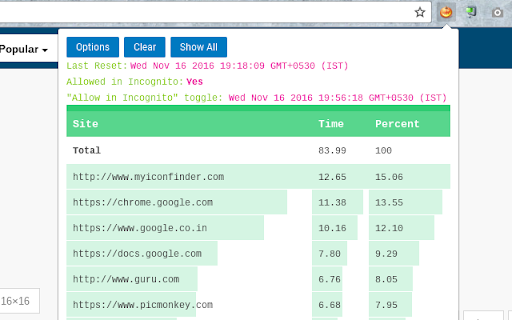
To keep track of how much time employee is spending on work & non-work related sites.
Time spent on each website (in terms of minutes or hh-mm-ss format) & percentage wise split is shown
Last Time Reset & 'Allow in Incognito' toggle data is shown in local timeformat
'Allow In Incognito' toggle showcases if the addon is tracking incognito mode or not
'Clear All' is associated with auto-csv file download to host machine so that a backup remains even in the worst scenario of accidental data deletion
60 secs of inactivity before the tracker goes into IDLE MODE!!
| 分类 | 📝工作流程与规划 |
| 插件标识 | jkannbbicbfnpkmbbjbalhigbnlifemg |
| 平台 | Chrome |
| 评分 |
☆☆☆☆☆
|
| 评分人数 | |
| 插件主页 | https://chromewebstore.google.com/detail/employee-time-tracker/jkannbbicbfnpkmbbjbalhigbnlifemg |
| 版本号 | 2.11.13 |
| 大小 | 120KiB |
| 官网下载次数 | 7 |
| 下载地址 | |
| 更新时间 | 2017-04-23 00:00:00 |
CRX扩展文件安装方法
第1步: 打开Chrome浏览器的扩展程序
第2步:
在地址栏输入: chrome://extensions/
第3步: 开启右上角的【开发者模式】
第4步: 重启Chrome浏览器 (重要操作)
第5步: 重新打开扩展程序管理界面
第6步: 将下载的crx文件直接拖入页面完成安装
注意:请确保使用最新版本的Chrome浏览器