
Extension Monarch Chrome 插件, crx 扩展下载
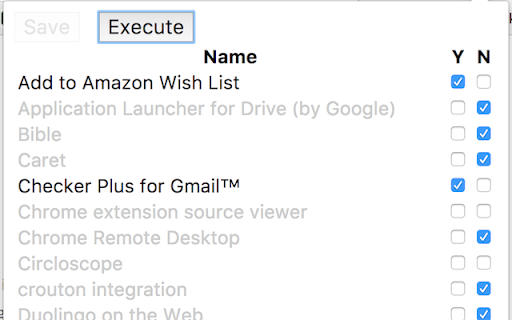
Rule over your extensions with, well, rules. Determine what will or will not be enabled on this browser instance!
Ever been frustrated by Chrome syncing the enabled status of all your extensions and apps so that all the junk you need on your ChromeBook is enabled everywhere else? Well, I have, so I wrote an extension to do something about it as everything else I tried didn't quite cover it for me. If you're in a similar boat, this might help!
The quick version: click the icon, go through the list of your extensions that pops up and check Y for those you want it to force to be enabled, N on those you want to force to be disabled, and leave the rest alone. Click Save, click Execute, and off you go! These rules are saved locally and never synced, since that would defeat the purpose.
There's also an option on the extension's very short options page as to whether you want it to automatically execute the rules when the browser starts. And finally, you can right-click the pretty butterfly icon and there's a menu item for executing the rules. Do it however works for you!
Release History:
0.0.3 (2017-07-06) -- added import and export
0.0.2 (2017-07-03) -- initial store release
| 分类 | 📝工作流程与规划 |
| 插件标识 | jknhajejnknlejdgmgjijheikiicbaob |
| 平台 | Chrome |
| 评分 |
☆☆☆☆☆
|
| 评分人数 | |
| 插件主页 | https://chromewebstore.google.com/detail/extension-monarch/jknhajejnknlejdgmgjijheikiicbaob |
| 版本号 | 0.0.3 |
| 大小 | 24.26KiB |
| 官网下载次数 | 19 |
| 下载地址 | |
| 更新时间 | 2017-07-14 00:00:00 |
CRX扩展文件安装方法
第1步: 打开Chrome浏览器的扩展程序
第2步:
在地址栏输入: chrome://extensions/
第3步: 开启右上角的【开发者模式】
第4步: 重启Chrome浏览器 (重要操作)
第5步: 重新打开扩展程序管理界面
第6步: 将下载的crx文件直接拖入页面完成安装
注意:请确保使用最新版本的Chrome浏览器