
AR Notes - Attach Notes on Web Page Chrome 插件, crx 扩展下载
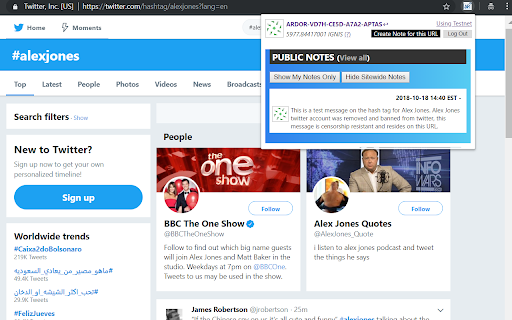
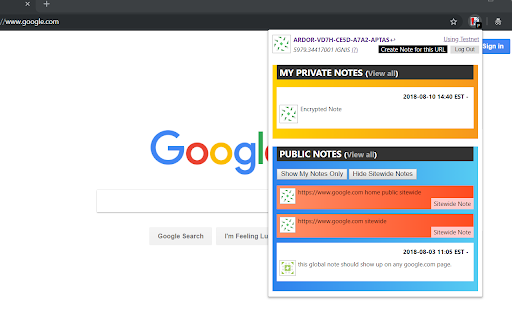

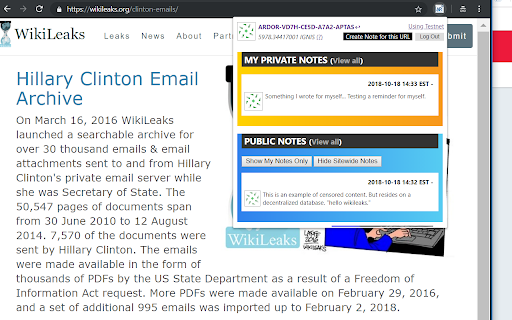
Take notes for web pages and access them with a single click when visiting them again. (Syncs to the Blockchain or Browser Only)
Ever needed to note down something about a webpage e.g. login id, frequent flyer number, membership number, tracking id etc. Something that you want to remember when you visit that page again.
AR notes is a dapp that lets you do that and much more in a slick way. Your notes live in the cloud allowing you to be free of the device. It's secure: data stays in your browser or on the Blockchain; you can encrypt your notes if you want that extra level of security or make it public for everyone else to see that visits the same page. There's more. See below for full features list:
* Steps to Use: *
- Install extension
- Click icon and enter in any user / password to generate your account (Save this. There is NO Forget Password option.)
- Go to any web page
- Click icon and create a note!
- If saving to the "Blockchain". First claim some free tokens to pay the fee, go here: https://www.ardor.world/en/faucet_ignis
This is beta software, all notes are written to the Testnet Blockchain on initial install, which can potentially get wiped due to testing. Please use a "Mainnet" Ardor node in the options if you like to have immutability of your notes.
* Features: *
- Take private or public notes and access them with a single click.
- Create public notes for everyone to see at a specific web page URL.
- Encrypt note with your main passphrase or add an additional layer of encryption. (Enabled in options)
- Option to add sitewide page notes. Sitewide notes are available for all the pages of the website.
- Sync your notes to the Ardor Blockchain Data Cloud. Stored forever.
- All notes are available through a single page to make it easy to search in your private and public notes.
- Browser icon changes color if there is a 'note' available for a web page.
- Multiple computers can stay in sync using sync to the blockchain feature, sign in with same user/pass.
- No 3rd party to trust. Data stays with the user -- either on the browser or user's Ardor account.
*Technical Features:*
- A decentralized application (dapp) with no centralized service provider.
- Built using the Decentralized Ardor Data Cloud as the back end database layer.
- Ability to use the Ardor Testnet or Mainnet servers when making notes. (Defaults to Testnet)
- Secondary passphrase for additional encryption which can be different for each page.
- Private and Public notes are censorship resistant and immutable.
Built with Ardor: https://www.ardorplatform.org
| 分类 | 📝工作流程与规划 |
| 插件标识 | jnfhpodaonohmgpjmipgelfppnfejejc |
| 平台 | Chrome |
| 评分 |
☆☆☆☆☆
|
| 评分人数 | |
| 插件主页 | https://chromewebstore.google.com/detail/ar-notes-attach-notes-on/jnfhpodaonohmgpjmipgelfppnfejejc |
| 版本号 | 3.4.3 |
| 大小 | 614KiB |
| 官网下载次数 | 21 |
| 下载地址 | |
| 更新时间 | 2019-06-08 00:00:00 |
CRX扩展文件安装方法
第1步: 打开Chrome浏览器的扩展程序
第2步:
在地址栏输入: chrome://extensions/
第3步: 开启右上角的【开发者模式】
第4步: 重启Chrome浏览器 (重要操作)
第5步: 重新打开扩展程序管理界面
第6步: 将下载的crx文件直接拖入页面完成安装
注意:请确保使用最新版本的Chrome浏览器