
Semantic inspector Chrome 插件, crx 扩展下载
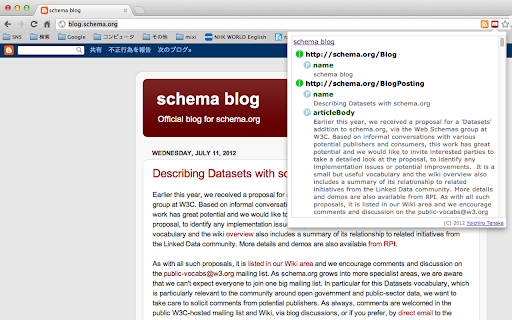
This extension shows you a structure written with HTML Microdata.
Currently, some search engines and social networking services can understand and use a HTML Microdata for providing users more rich experiences. Therefore a Web site owner and a content providers must support its specification and must write a semantic into their pages. However, this is not easy generally. At least, I think that its confirmation should be more easily.
This extension can parse a Web page and understand a structure of items, and shows you it with a simple way which you click only a button of this extension.
The first version is supporting HTML Microdata only. Other specifications will be supported.
[Privacy policy]
This extension collects an usage information by Google Analytics, but it never send a personal information, Web sites information and etc. to Google Analytics. And, a cookie will be used for tracking.
History:
Version 1.2.2: January 20th, 2017
- Support local document.
Version 1.2.1: January 20th, 2017
- Fix an issue about generating parent-children relations of each node.
Version 1.2.0: April 14th, 2015
- Supported @itemprop-reverse property.
Version 1.1.0: July 19th, 2012
- Supported an itemid property, and fixed the problem which supporting tags to be processed especially were not enough.
Version 1.0.0: July 19th, 2012
- Released the initial version.
| 分类 | 💻开发者工具 |
| 插件标识 | jobakbebljifplmcapcooffdbdmfdbjh |
| 平台 | Chrome |
| 评分 |
☆☆☆☆☆
|
| 评分人数 | |
| 插件主页 | https://chromewebstore.google.com/detail/semantic-inspector/jobakbebljifplmcapcooffdbdmfdbjh |
| 版本号 | 8.3 |
| 大小 | 49.44KiB |
| 官网下载次数 | 4000 |
| 下载地址 | |
| 更新时间 | 2017-01-20 00:00:00 |
CRX扩展文件安装方法
第1步: 打开Chrome浏览器的扩展程序
第2步:
在地址栏输入: chrome://extensions/
第3步: 开启右上角的【开发者模式】
第4步: 重启Chrome浏览器 (重要操作)
第5步: 重新打开扩展程序管理界面
第6步: 将下载的crx文件直接拖入页面完成安装
注意:请确保使用最新版本的Chrome浏览器