
MemoRISE Chrome 插件, crx 扩展下载
This extension helps you learn things with no effort.
⚠️ WARNING:
This is an alpha release so you may face some issues using this extension.
In case of any bugs detected please let us know and we fix them ASAP.
? What is this❓
? This extension is a tool for effective learning.
This a browser extension that helps you learn faster, remember longer, and boost your productivity.
Why do I need this❓
? Forgetting curve is a part of a ?learning process.
? [Constant revision] of what you learn has a key role in ?learning process.
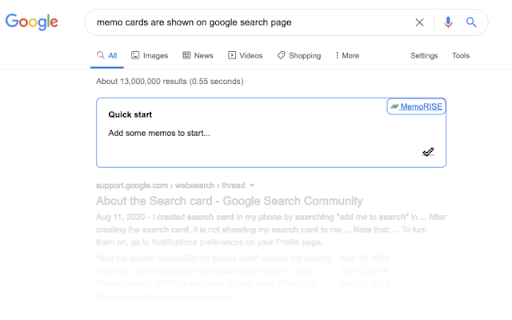
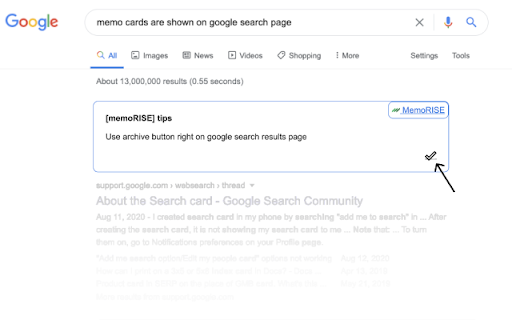
↗️ This extension shows you [advertisment-like cards ?] on [Google search results page].
What can I use this for❓
Here are a *couple of ideas* for you:
?️ [Learning foreign languages] like Spanish??, French??, Italian??, Chinese?? etc.
? Historical dates
? Song texts
... and [YOU name it] what you are aiming to ©️MemoRISE and [remember]?
Your imagination is the limit ?.
⏩ [Example workflow] use case of ©️MemoRISE:
1️⃣ ->➕ [add] *memo cards*
2️⃣ -> ?️?️ [watch] *memos cards* to appear on the [Google search result page]
3️⃣ -> ? [the more you see] a *memo card* [the better is remembering]
4️⃣ -> ? once you're [done] you can -> [archive] the *memo card*
⚡Key features:
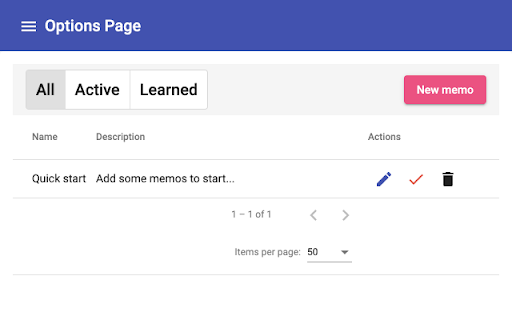
? add *memo cards* on the [options page]
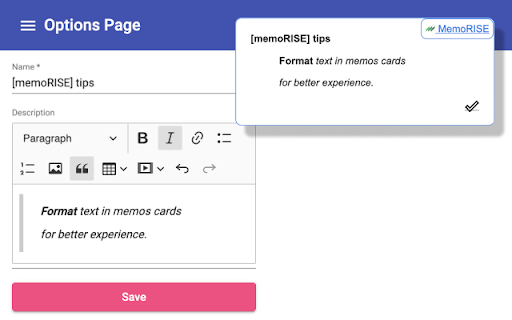
? [rich text editor] for *memo cards*:
- - > bold, italic, cursive formatting
- - > links
- - > and more...
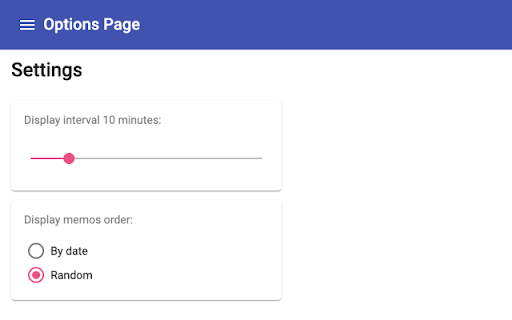
? [random?] and [creation date ?] order for *memo cards* to show up
? [Active], [Learned] (e.g archived) *memo cards* lists for convenient management
? [Display Interval] setting which restricts how often you see *memo card*
?️ Roadmap:
? featured [predefined list] of *memo cards*
? more user friendly *memo cards* creation
? different template for *memo cards*
? sync between devices
? stats page
©️MemoRISE extension works like an [advertisement of your personal knowledge].
| 分类 | 📝工作流程与规划 |
| 插件标识 | jopifgpfoeeeodfdpbmibkidoldcpeco |
| 平台 | Chrome |
| 评分 |
☆☆☆☆☆
|
| 评分人数 | |
| 插件主页 | https://chromewebstore.google.com/detail/memorise/jopifgpfoeeeodfdpbmibkidoldcpeco |
| 版本号 | 0.57.0 |
| 大小 | 2.84MiB |
| 官网下载次数 | 566 |
| 下载地址 | |
| 更新时间 | 2021-08-09 00:00:00 |
CRX扩展文件安装方法
第1步: 打开Chrome浏览器的扩展程序
第2步:
在地址栏输入: chrome://extensions/
第3步: 开启右上角的【开发者模式】
第4步: 重启Chrome浏览器 (重要操作)
第5步: 重新打开扩展程序管理界面
第6步: 将下载的crx文件直接拖入页面完成安装
注意:请确保使用最新版本的Chrome浏览器