
DictationBox Chrome 插件, crx 扩展下载

Live Speech and Commands Recognition using DictationBox. Click on DictationBox extension icon and start dictation, that simple.
Features:
- Supported 100+ languages and dialects
- Simple dictation using DictationBox text area field
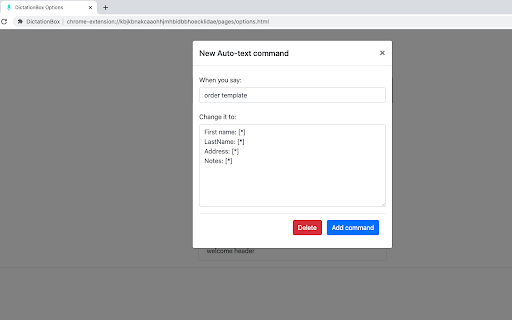
- Auto-text commands are configurable in extension options
- Say "next field" to navigate to next [*] field, see auto-text command "order template" for example.
- Say "go to sleep" \ "wake up" to switch microphone between standby and listening modes.
Latest changes:
v.1.1.11: fixed issue when auto-text commands were not recognized on startup
v.1.1.10: fixed issue when "next field" command wasn't tracking text
v.1.1.9: added "Rate Us" button
v.1.1.7: cosmetic changes, bug fixes
v.1.1.6: added panel options button, updated icon
v.1.1.4: improved microphone error handling and documentation
| 分类 | 📝工作流程与规划 |
| 插件标识 | kbjkbnakcaaohhjmhbidbbhoecklidae |
| 平台 | Chrome |
| 评分 |
☆☆☆☆☆
|
| 评分人数 | |
| 插件主页 | https://chromewebstore.google.com/detail/dictationbox/kbjkbnakcaaohhjmhbidbbhoecklidae |
| 版本号 | 25.2.3.0 |
| 大小 | 1.07MiB |
| 官网下载次数 | 4000 |
| 下载地址 | |
| 更新时间 | 2022-09-22 00:00:00 |
CRX扩展文件安装方法
第1步: 打开Chrome浏览器的扩展程序
第2步:
在地址栏输入: chrome://extensions/
第3步: 开启右上角的【开发者模式】
第4步: 重启Chrome浏览器 (重要操作)
第5步: 重新打开扩展程序管理界面
第6步: 将下载的crx文件直接拖入页面完成安装
注意:请确保使用最新版本的Chrome浏览器