
Trello Boosted Boards Chrome 插件, crx 扩展下载
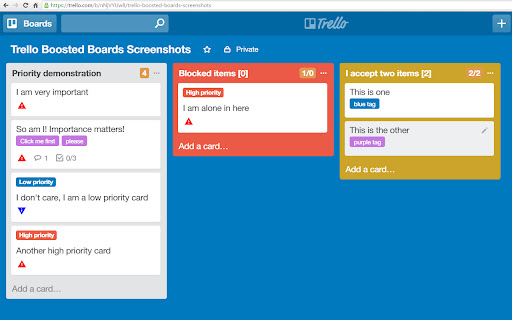
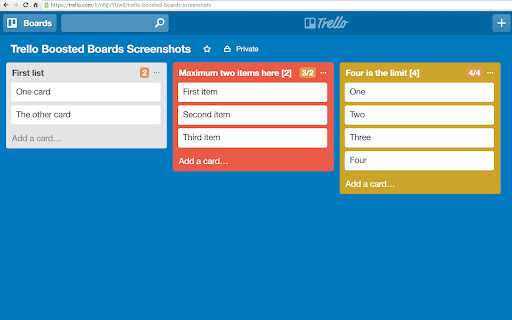
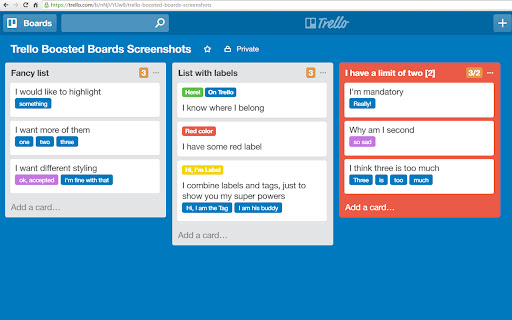
Boost your Trello Boards with Tags, Labels, Priorities, Counters, Calendar and more
Boost your Trello Boards with Tags, Labels, Priorities, Counters and more
* Card Counter
Display number of cards in a list and choose maximum number
* Card Tags
Add custom tags to the card title
* Card Labels
Add custom tags to the card title
* Card Priority
Cards can have three levels of priority now
* Calendar
Add cards to calendar - useful for vacations, sick leaves, national holidays, deadlines, etc.
To request a feature, suggest an improvement, or report a bug, please send an email to: [email protected]
==============================
Release notes:
* 0.6
- Significant performance improvements
- New popup and options pages
- New feature: inactive cards
* 0.5.1
- Add High or Low priority to card, by using !1 or !2
- Minor bug fixes, performance issues
==============================
* Disclaimer:
Trello Boosted Boards is not affiliated, associated, authorized, endorsed by or in any way officially connected to Trello, Inc.
| 分类 | 📝工作流程与规划 |
| 插件标识 | kdnfiaaebipjfmlajbklkkcgkddakdnf |
| 平台 | Chrome |
| 评分 |
☆☆☆☆☆
|
| 评分人数 | |
| 插件主页 | https://chromewebstore.google.com/detail/trello-boosted-boards/kdnfiaaebipjfmlajbklkkcgkddakdnf |
| 版本号 | 0.6.7 |
| 大小 | 479KiB |
| 官网下载次数 | 3000 |
| 下载地址 | |
| 更新时间 | 2017-08-10 00:00:00 |
CRX扩展文件安装方法
第1步: 打开Chrome浏览器的扩展程序
第2步:
在地址栏输入: chrome://extensions/
第3步: 开启右上角的【开发者模式】
第4步: 重启Chrome浏览器 (重要操作)
第5步: 重新打开扩展程序管理界面
第6步: 将下载的crx文件直接拖入页面完成安装
注意:请确保使用最新版本的Chrome浏览器