
My Reading List Chrome 插件, crx 扩展下载
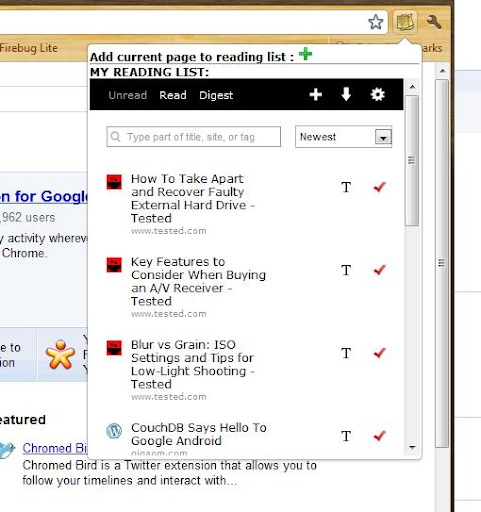
Maintain a reading list for leisurely reading
Maintain a reading list for leisurely reading (Thanks to 'Read It Later (Pocket)')
NOTE: New users, please register from the extensions options page, by providing a username and password. (Right click on the extension and go to Options)
If you already have an account with readitlater, save your username/password.
NOTE: No username/password is stored on any server or transferred over the network. The login credentials entered are stored locally within the browser local storage in your own systems.
- When you use the extension for the first time, you will be asked to log-in with your account.
- Add a web page to your reading list by clicking on the green + icon.
- Run through your reading list/unread pages from the extension.
- Mark a web-page as 'read', by clicking on the red tick mark against that page.
- Review your the pages you have read from the 'Read' list.
My other extensions:
Torrent Search: https://chrome.google.com/extensions/detail/iangilbioefodhifefjcefjmdecdppip
Live Twitter Search: https://chrome.google.com/extensions/detail/gkhcahpmjhkmikakojimclfndapcoebg
| 分类 | 📝工作流程与规划 |
| 插件标识 | kdollpkhgalgcngiilcninngilhkceha |
| 平台 | Chrome |
| 评分 |
☆☆☆☆☆
|
| 评分人数 | |
| 插件主页 | https://chromewebstore.google.com/detail/my-reading-list/kdollpkhgalgcngiilcninngilhkceha |
| 版本号 | 25.2.3.0 |
| 大小 | 122KiB |
| 官网下载次数 | 621 |
| 下载地址 | |
| 更新时间 | 2015-07-15 00:00:00 |
CRX扩展文件安装方法
第1步: 打开Chrome浏览器的扩展程序
第2步:
在地址栏输入: chrome://extensions/
第3步: 开启右上角的【开发者模式】
第4步: 重启Chrome浏览器 (重要操作)
第5步: 重新打开扩展程序管理界面
第6步: 将下载的crx文件直接拖入页面完成安装
注意:请确保使用最新版本的Chrome浏览器