
teamlink Chrome 插件, crx 扩展下载


Easiest way to sync, collaborate and search bookmarks
Build your knowledge bank with bookmarks
Quick bookmark links you find useful and we will make sure you find it when you need them the most.
Get one of the best Productivity tools on Chrome!
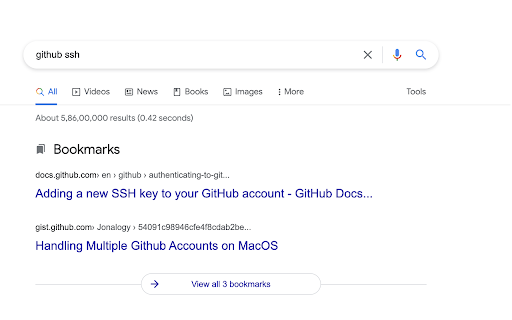
★ Augmented Bookmark Search
Get matching bookmarks directly in your google searches.
★ Omnibox Bookmark Search
Search bookmarks directly from browser address bar Press L and space followed by search query.
★ Quick Add/Remove Bookmark
Add/Remove bookmarks quickly using keyboard shortcut Ctrl + Shift + L
★ Sync, Share Bookmarks with Teams (Coming Soon!)
Create team workspaces, share and collaborate bookmarks with your teams
✔ Get started in seconds
Quick one click install and you will never have to waste time finding same thing again and again.
Privacy Policy at: https://getteamlink.web.app/privacy.html</a>
Learn more about the extension: https://teamlink.web.app
| 分类 | 📝工作流程与规划 |
| 插件标识 | keefgegllkbafoneklpidccocjllbenl |
| 平台 | Chrome |
| 评分 |
☆☆☆☆☆
|
| 评分人数 | |
| 插件主页 | https://chromewebstore.google.com/detail/teamlink/keefgegllkbafoneklpidccocjllbenl |
| 版本号 | 25.2.3.0 |
| 大小 | 307KiB |
| 官网下载次数 | 81 |
| 下载地址 | |
| 更新时间 | 2021-10-17 00:00:00 |
CRX扩展文件安装方法
第1步: 打开Chrome浏览器的扩展程序
第2步:
在地址栏输入: chrome://extensions/
第3步: 开启右上角的【开发者模式】
第4步: 重启Chrome浏览器 (重要操作)
第5步: 重新打开扩展程序管理界面
第6步: 将下载的crx文件直接拖入页面完成安装
注意:请确保使用最新版本的Chrome浏览器