
Host name rewriter Chrome 插件, crx 扩展下载
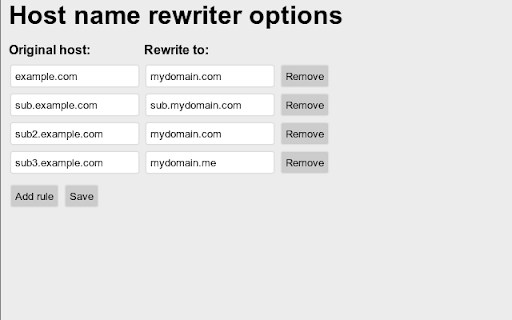
Rewrite URLs for using a different host when accessing a web page.
Extension for rewriting of host names when accessing a webpage. Will rewrite the host name regardless of method of access, both clicking a link and writing URL will work.
Usage example: Attempts to reach 'example.com/something' will be redirected to 'mydomain.com/something'.
A sub domain, 'sub.example.com', will not be rewritten if a rule for 'example.com' is present. A specific rule for 'sub.example.com' needs to be added.
The extension needs to be configured from the extension button or options page before starting to work.
Version History
* 1.3.0 - Fix rewrite after redirect
* 1.2.1 - Sync changes between options and action.
* 1.2.0 - Improvements of interface and usability
* 1.1.0 - Improve performance and interface
* 1.0.1 - Fix installation
* 1.0.0 - Initial release
| 分类 | 📝工作流程与规划 |
| 插件标识 | kgkjmljnaneinhnbbdhigejjffonhffb |
| 平台 | Chrome |
| 评分 |
☆☆☆☆☆
|
| 评分人数 | |
| 插件主页 | https://chromewebstore.google.com/detail/host-name-rewriter/kgkjmljnaneinhnbbdhigejjffonhffb |
| 版本号 | 25.2.3.0 |
| 大小 | 28.02KiB |
| 官网下载次数 | 1000 |
| 下载地址 | |
| 更新时间 | 2017-10-14 00:00:00 |
CRX扩展文件安装方法
第1步: 打开Chrome浏览器的扩展程序
第2步:
在地址栏输入: chrome://extensions/
第3步: 开启右上角的【开发者模式】
第4步: 重启Chrome浏览器 (重要操作)
第5步: 重新打开扩展程序管理界面
第6步: 将下载的crx文件直接拖入页面完成安装
注意:请确保使用最新版本的Chrome浏览器